How to Use SEO to Get More Clients Without Paid Advertising

Running paid ads feels great at first. You put money in, and you get traffic out.
Then you turn off the budget. Instantly, the phone stops ringing, the inbox goes quiet, and your sales drop to zero.
Relying completely on paid ads is like renting a house. The moment you stop paying rent every month, you are out on the street.
Search Engine Optimization (SEO) is totally different. SEO is like buying property and building equity. When you build helpful content and set up your website properly, Google keeps sending potential buyers to your business day and night. You do not have to pay for each individual click.
If you are a service business, a freelancer, or an agency owner wondering how to get steady leads without burning your cash on paid ads, this complete guide is for you. We will break down everything in plain English, step by step, just like two friends sitting down for coffee.
What Does It Really Mean to Use SEO to Get More Clients?
Before we jump into the steps, let us get on the exact same page.
Most people overcomplicate search engine optimization. They use big technical words and try to make it sound like rocket science. In reality, Google has one simple goal: to give the person searching the single best answer to their problem.
When someone types a question into Google, they are looking for help. If your website gives them the clearest, most honest, and most helpful solution, Google wants to show your page at the very top.
When you learn how to use SEO to get more clients without paid advertising, you are not trying to "trick" an algorithm. You are simply setting up your website so that ideal clients can easily find you when they already need your help.
The Big Difference: Paid Ads vs Organic Search
Let us look at a quick comparison between paid ads and search engine optimization:
Paid Ads (PPC): Fast results. You pay every time someone clicks your link. When your daily budget runs out, your visibility vanishes completely.
Organic Search (SEO): Takes some time to get rolling. Costs zero dollars per click. Once your pages rank at the top, they can bring you hot leads for months or even years.
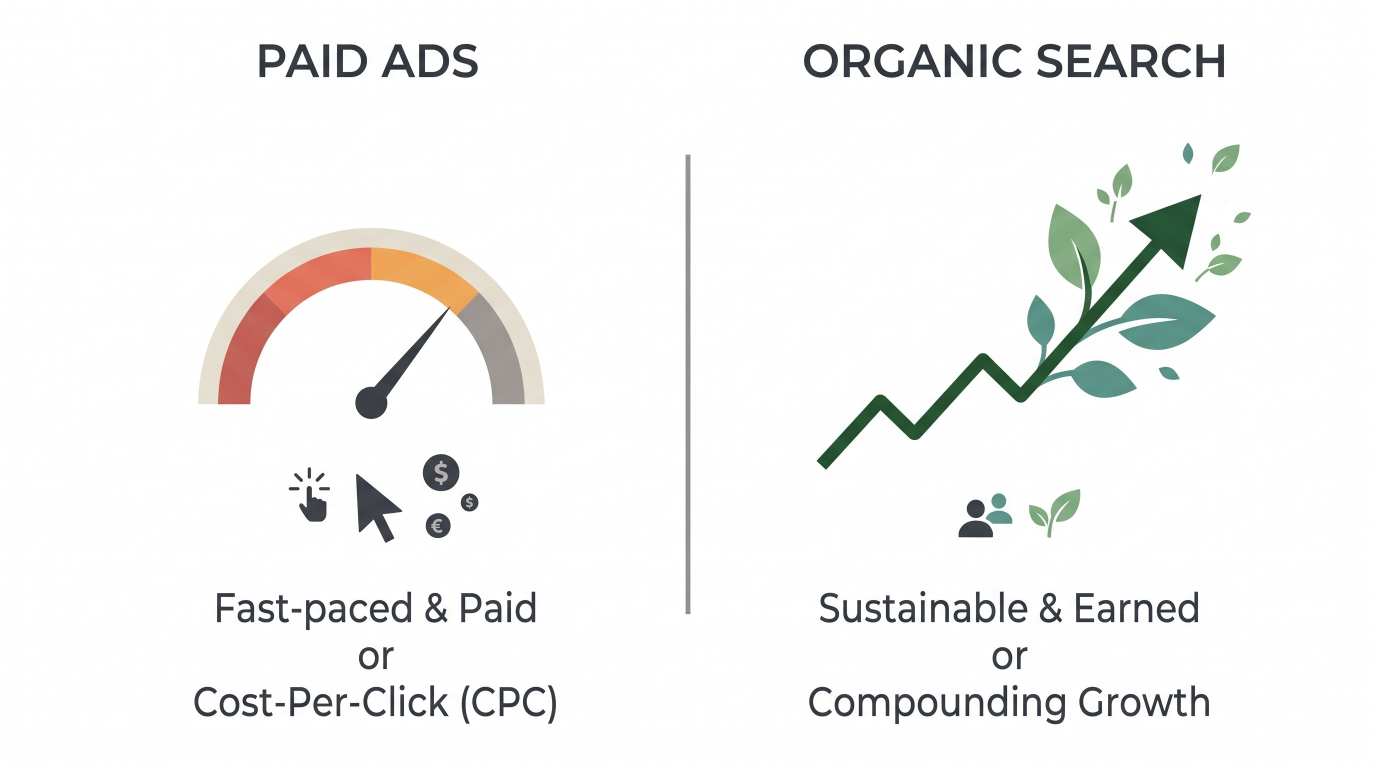
Many businesses spend a small fortune testing both seo sem marketing channels. While search engine marketing (SEM) and paid ads definitely have their place for quick testing, organic SEO creates long-term profit margins that paid campaigns simply cannot match.
Step 1: Find Keywords That Bring Paying Clients (Not Just Casual Readers)
Traffic is nice, but traffic does not pay your bills. Clients pay your bills.
The biggest mistake people make with SEO is chasing keywords that get thousands of searches but zero sales.
For instance, if you rank number one for "what is marketing," you will get thousands of college students writing essays. None of them will hire you. But if you rank for "b2b marketing consultant for software companies," you might only get fifty visitors a month, yet five of them might turn into high-paying clients.
Understanding Buyer Intent
Every search query has an intention behind it. We group keywords into three simple buckets:
Informational: People just want to learn. Example: "how does local seo work?"
Navigational: People want to find a specific website. Example: "ahrefs login"
Commercial / Transactional: People are actively looking to hire or buy. Example: "best seo optimization companies for small business" or "hire an agency near me."
If your main goal is to get clients quickly, focus 80% of your energy on commercial keywords and specific problem-solving questions.
How to Find Great Keywords for Free
You do not need to buy expensive software tools right away. You can find incredible keywords using free methods:
Google Autocomplete: Go to Google. Start typing your service name. See what Google predicts in the dropdown box. Those suggestions are real searches people type every single week.
People Also Ask: Scroll down a bit on any search result page. Open the little question accordions. Google gives you a direct list of the exact questions your buyers want answered.
Competitor Pages: Look at a successful seo company or service provider in your field. Look at the menu links on their homepage. Look at the titles of their popular blog posts. That shows you what works in your market.
Step 2: Build Service Pages That Turn Visitors into Phone Calls
Getting a visitor onto your website is only half the battle. If your page looks messy, confusing, or outdated, that visitor will click the "back" button in five seconds.
Google watches user behavior closely. If people leave your page quickly, Google assumes your page is unhelpful and pushes you down in the rankings.
The Perfect Client-Getting Page Layout
Every service page on your website should follow a simple, natural flow:
A Clear Headline: State clearly what you do, who you help, and the main benefit. Keep it simple. Avoid clever poetry; clarity always wins.
The Problem: Describe the exact frustration your client is dealing with right now. Let them know you understand their pain.
Your Solution: Explain clearly how your service fixes that exact problem.
Social Proof: Show reviews, client quotes, screenshots, or short case studies. People trust other people.
A Direct Call to Action (CTA): Tell them exactly what to do next. Do not say "Submit." Say "Book a Free 15-Minute Strategy Call" or "Request a Fast Quote."
Internal Linking: The Secret Sauce
When you write blog articles, always add helpful links inside the text pointing directly back to your main service pages.
For example, if you run a firm offering seo for companies, every informational post you write about keyword research or site speed should naturally link back to your main service page. This helps Google discover your key pages, passes ranking power, and shows readers where they can hire you.
Step 3: Local SEO and Google Business Profile Optimization
If you serve clients in a specific city, state, or region, you have an unfair advantage. Local searches convert into paying customers faster than almost any other type of traffic.
When someone searches for a service nearby, Google shows the "Local Map Pack" at the very top of the page. Getting into those top three map spots can fill your calendar with leads.
Nailing Your Google Business Profile Optimization
Setting up your profile properly takes less than an afternoon, but it delivers results for years:
Use Your Real Business Name: Do not try to stuff ten extra keywords into your business name. Google will suspend your listing. Use your actual business name.
Pick the Most Accurate Primary Category: The primary category you choose holds massive weight in local rankings. If you offer marketing services, select the category that fits best.
Fill Out Every Single Field: Add your hours, your service area, your website URL, your phone number, and a detailed description of what you do.
Upload High-Quality Photos: Add pictures of your office, your team, your work, and your real daily projects. Listings with real photos get far more clicks than profiles with blank spaces or generic stock images.
Collect and Answer Reviews: Ask happy clients to leave an honest review. When they mention the service you provided in their review, it helps your visibility even more. Always reply politely to every review, whether good or bad.
Mastering Local SEO Beyond Maps
Local search does not stop with your map listing. To dominate your immediate area, you also need solid local seo signals across the web:
Consistent NAP (Name, Address, Phone): Make sure your business name, address, and phone number look identical everywhere online (your website footer, Yelp, local directories, Chamber of Commerce).
City-Specific Landing Pages: If you serve three nearby towns, build a dedicated, helpful page for each town. Talk about local projects, mention local landmarks, and show local testimonials.
Step 4: Write Helpful, Problem-Solving Blog Content
Many people publish twenty blog posts and then give up because nobody reached out. The reason is usually simple: they wrote about things they find interesting, not what their clients are desperately trying to fix.
If you run an agency offering seo for agencies (white-label services) or helping small brands, your content should answer real business questions:
"Why is my website traffic dropping this month?"
"How much does hiring an agency actually cost?"
"How long does it take for content marketing to show returns?"
When you provide the most honest answer without holding back secrets, the reader instantly trusts you. And when they decide they do not want to do the hard work themselves, who do you think they will call? They will call the person who taught them how it works.
Tips for High-Readability Writing
If you want people to stay on your page and finish reading your post, make it easy to consume:
Short paragraphs: Keep paragraphs under three or four sentences. Big walls of text scare people away, especially on mobile phones.
Use bullet points: Lists make complex steps easy to scan and digest.
Write like you speak: Imagine you are talking to a smart friend who works in a different industry. Ditch corporate jargon.
Clear subheadings: Use H2 and H3 tags every few hundred words so readers can easily find the exact section they need.
Step 5: On-Page SEO Essentials (Making Search Engines Fall in Love With Your Site)
On-page SEO simply means organizing the words and code on your page so search engine robots can understand your topic instantly.
Here is a simple checklist you can apply to every single post and page:
Element | Best Practice | Why It Matters |
Title Tag | Keep it under 60 characters. Place your main keyword near the front. | This is the clickable headline people see in Google search results. |
Meta Description | 140 to 160 characters. Include your focus keyword and a clear benefit. | Acts like free ad copy. A good description increases your click rate. |
H1 Tag | One per page. Make it clear and matching the reader's expectation. | Tells Google the primary topic of the entire document. |
H2 & H3 Subheadings | Break your thoughts into logical mini-topics. | Helps search engines understand the structure and depth of your answer. |
Clean URLs | Short, readable slugs (e.g., | Simple URLs are easy for both users and web crawlers to read. |
Image Alt Text | Describe the image accurately in a few words. | Helps visually impaired readers and allows Google Images to index your pictures. |
When professional seo optimization companies audit a website, fixing these simple on-page elements is usually the first thing they tackle. It costs nothing to fix, yet it yields instant improvements in search visibility.
Step 6: Simple Technical SEO (Fast, Clean, and Mobile-Friendly)
You do not need to be a software engineer to handle technical SEO. You just need to ensure your site is not broken, slow, or annoying to use.
1. Make Sure Your Website Is Blazing Fast
Nobody waits around for a slow site to load. If your page takes more than three seconds to appear, visitors will click away back to Google.
Compress large images before uploading them.
Use a clean, lightweight website theme.
Choose reliable, fast web hosting instead of cheap bargain servers.
2. Mobile Experience Is Everything
More than half of your potential clients will find your website on a smartphone. Test your website on your own phone.
Are the buttons easy to tap with your thumb? Is the text large enough to read without pinching to zoom? Does the contact form work smoothly on a small screen? If your site feels clunky on mobile, you are losing clients every single week.
3. Keep Your Navigation Painless
Do not hide your most important pages inside complicated drop-down menus. A visitor should be able to land on your homepage and find your services, your pricing or process, your past work, and your contact page in one single click.
Step 7: Build Authority Without Risky or Spammy Link Schemes
Backlinks are links from other websites pointing to your website. Google views a backlink like a vote of confidence. If many respected websites link to your guide, Google thinks, "This must be a trustworthy resource," and moves you higher up in the rankings.
However, stay far away from shady offers that promise "1,000 links for fifty dollars." Those links come from spam networks and will get your website penalized or completely banned from Google search results.
Instead, build clean, natural authority:
Partner With Complementary Businesses
Think about businesses that share your exact target audience but do not compete with you directly.
For example, if you offer website development, partner with copywriters, photographers, and local business accountants. Write a guest article for their blog, host an educational webinar together, or share client referrals. These relationships produce natural, high-authority backlinks that drive qualified clients straight to you.
Create Original Case Studies and Data
Whenever you achieve a great result for a client, write down the story:
What was the problem when they hired you?
What exact changes did you implement?
What were the tangible results after six months?
People love linking to real numbers and honest stories. A single great case study can earn links from industry blogs, podcasts, and social media discussions without you ever having to beg for them.
How to Convert Organic Visitors into Signed Contracts
Let us be completely honest with each other: rankings and traffic numbers are purely vanity metrics if they do not turn into money in your bank account.
Here is how you turn a regular reader into a signed client:
1. Offer a Simple, High-Value Lead Magnet
Not every visitor is ready to book a sales call on their very first visit. Some people need a little time to get to know you.
Offer them something genuinely helpful in exchange for their email address:
A one-page cheat sheet
A simple project cost calculator
A 10-point audit checklist
Once they are on your email newsletter list, send them one helpful tip every week. When they are finally ready to hire someone, you will be the first person they think of.
2. Remove Friction from Your Contact Form
Do not ask someone to fill out a fifteen-field form just to ask you a question. Keep your contact form down to three or four simple fields:
Name
Email address
Website or business name
How can we help you?
Every extra form field you add reduces the number of people who complete it. Make it effortless for them to reach out.
3. Respond Fast
When an organic lead fills out your contact form, reply as fast as humanly possible. If you wait two days to get back to them, they will have already contacted two other service providers. Fast communication sets a professional tone before the project even begins.
Common SEO Mistakes to Avoid
To keep your website safe and growing smoothly, make sure to steer clear of these common pitfalls:
Keyword Stuffing: Never repeat your focus phrase twenty times in awkward sentences. Write naturally for human beings first. Search engines are smart enough to understand context.
Targeting Only Super Broad Keywords: Trying to rank for one-word terms like "consulting" or "marketing" will take years of frustrating effort. Target specific, three-to-five-word long-tail phrases where buyers hang out.
Giving Up Too Early: SEO is not an overnight trick. It is a compounding flywheel. The effort you put in today will begin showing real fruits in three to six months. Be patient, stay consistent, and watch the momentum build.
Neglecting Analytics: Install Google Search Console and Google Analytics (both are 100% free). Check them once every two weeks to see which pages bring the most clicks and which queries people use to find your work.
Step-by-Step 90-Day Action Plan
If you feel overwhelmed by all this information, do not worry. You do not have to do everything today. Follow this simple 90-day plan to get your first wave of organic clients:
Month 1: The Foundation
Claim and complete your Google Business Profile.
Clean up your website navigation so your service pages are easy to find.
Make sure your site loads fast on both desktop and mobile devices.
Write down a list of 15 practical questions your recent clients asked you.
Month 2: Content Creation
Turn those 15 questions into five detailed, helpful blog articles.
Optimize the title, headings, and meta descriptions of each article.
Add direct links from each new blog post back to your main service inquiry page.
Add a simple contact form or call-booking link at the bottom of every page.
Month 3: Promotion and Authority
Share your articles on LinkedIn, your email list, and relevant online business groups.
Reach out to three non-competing business owners to discuss guest posting or referral swaps.
Ask your last five happy clients to leave an honest review on your Google profile.
Review your Google Search Console data to see what keywords are gaining traction, and double down on what works
Want more qualified leads without paid ads? Claim your free website audit and find out exactly what is holding your site back. Let's Book a Free Audit
Frequently Asked Questions
How long does it take for SEO to bring in actual clients?
For local businesses and niche service providers, you can often start seeing steady inquiries within 60 to 90 days of publishing high-intent pages. For broader or national industries, it typically takes four to six months of consistent publishing to build strong organic momentum.
Do I have to hire an expensive agency to do this?
No. While many businesses eventually choose to hire an established seo company to scale up faster or save personal time, any business owner can execute the fundamentals outlined in this guide and generate great results on their own.
What is the difference between SEO and SEM?
SEO focuses on earning free, organic visibility by creating top-quality content and a great user experience. SEM involves paying search engines to place your link at the top of search results. Both have value, but organic search provides compounding value without daily ad spend.
Final Thoughts: Start Building Your Organic Growth Engine Today
Learning how to use SEO to get more clients without paid advertising is one of the most liberating skills you can build for your business.
You no longer have to worry about ad costs rising every quarter. You no longer have to stress over whether your ad accounts will get flagged or paused.
Pick one commercial keyword this week. Write the single most helpful, practical guide on the internet for that topic. Make it easy for your readers to take the next step and contact you. Once you see that very first organic lead appear in your inbox, you will never want to rely solely on paid ads ever again.
Ready to grow your business?
Contact us today to find out how our strategies can scale your operations to the next level.
Contact Us