How to Get Web Design Clients on Instagram in 2026
Let’s be honest for a second.
If you ask ten different freelance developers or designers where they find their work, half of them will tell you: "Upwork is too crowded," or "Cold emails just land in spam."
Then someone mentions Instagram. And your first thought might be:
"Wait, isn’t Instagram just for fashion, food pictures, dance reels, and travel bloggers? Does anyone actually hire someone to build a website off an Instagram DM?"
The short answer is yes. 100% yes.
In fact, right now in 2026, Instagram is one of the strongest search engines and networking tools for small business owners, startup founders, coaches, local clinics, and ecommerce brands. Every single day, business owners scroll through Instagram looking for people who can solve their real problems.
A bad website costs a business owner real money. When their site is slow, looks outdated on mobile, or fails to convert visitors into paying customers, they get frustrated. If you show up on their feed at the exact right moment with the solution, you win the gig.
You do not need 50,000 followers. You do not need expensive video gear. You do not need to dance on camera.
All you need is a simple, repeatable plan. In this complete guide on how to get web design clients on Instagram in 2026, we will break down the exact steps: how to set up your profile, what content to post, how to reach out without sounding spammy, and how to close deals cleanly in your direct messages.
Grab a coffee, open your notes app, and let’s get into it.
Step 1: Turn Your Instagram Profile into a High-Converting Landing Page
Before you post a single Reel or send a single message, take a hard look at your profile.
Think of your Instagram profile like the homepage of your own website. When an interested business owner clicks on your username, you have about three seconds to answer three basic questions:
Who are you?
What problem do you solve, and for whom?
What should they do next?
If your bio says "Coffee lover | Dreamer | Web enthusiast | DM for collabs", you are losing clients. Let’s fix that right now.
1. Choose a Clear Username and Profile Photo
Keep your username simple. Avoid random numbers, five underscores, or hard-to-spell words. If your name is Alex Miller, try something like:
@alexmillerdesign@alexcreateswebsites@millerwebstudio
For your profile picture, use a high-quality, friendly photo of your face smiling, looking straight at the camera. People buy from people, not faceless logos. If you run an agency, a crisp, clean brand mark works too, but a personal face almost always builds trust faster.
2. Optimize Your Name Field for Search (Instagram SEO)
Did you know that the "Name" line on your profile is searchable on Instagram?
Do not just put your name there. Put your main keywords next to it so you show up when someone searches for a designer.
Bad Name Field: Alex
Good Name Field: Alex | Web Designer & Shopify Expert
Good Name Field: Sarah | WordPress & Webflow Websites
When a local coffee shop owner or fitness coach searches "Web Designer" in the Instagram search bar, accounts with those keywords in the name field show up first.
3. Write a Bio That Speaks Directly to the Client
A winning bio follows a simple four-part formula:
Line 1: Who you help and the result you deliver.
(Example: "I help local service businesses build clean websites that turn visitors into phone calls.")
Line 2: Social proof or your primary tech stack.
(Example: "Built 40+ sites using Webflow & WordPress | 5-star rated")
Line 3: A free resource, case study, or clear offer.
(Example: "Get a free 5-minute video audit of your current site 👇")
Line 4: A single, clear link.
4. Set Up a Single, Purposeful Link
Do not give people a messy link page with fifteen different buttons. A visitor gets overwhelmed and clicks nothing.
Give them one clear destination:
A link to book a 15-minute discovery call, OR
A one-page portfolio showing 3 of your best case studies with an easy contact form.
Make sure that page loads instantly on mobile devices. If your portfolio website is slow, nobody will hire you to build theirs!
Step 2: Pick a Clear Niche (Why Generalists Struggle on Social Media)
Here is a trap many beginners fall into: they want to build websites for everyone.
They think: "If I offer websites to restaurants, dentists, gyms, lawyers, and clothing brands, I have a bigger market!"
In reality, the opposite happens. When you speak to everyone, you speak to no one.
Imagine you are a dentist looking for a new website. You see two profiles on Instagram:
Designer A: "I build websites for all businesses, personal blogs, and shops."
Designer B: "I design patient-booking websites for dental practices and health clinics."
Who are you going to trust with your money? Designer B every single time. They understand your industry, your booking software, and your patient needs.
Profitable Niches for Web Designers in 2026
You do not have to stay in one niche forever, but picking one or two for 90 days makes marketing ten times easier. Here are great niches to consider:
Home Service Businesses: Plumbers, roofers, painters, HVAC contractors, landscapers. These business owners often have terrible, outdated websites, but they have healthy budgets and want more local calls.
Health and Wellness: Dentists, chiropractors, physiotherapists, yoga studios. They need simple booking systems and clear location pages.
Ecommerce and Boutique Brands: Sustainable fashion, skincare lines, artisan food makers. They need fast Shopify or WooCommerce setups with high-converting product pages.
Coaches and Consultants: Fitness coaches, business consultants, career counselors. They need clean landing pages and lead-capture funnels.
Pick an industry you understand or genuinely enjoy learning about. Your content will instantly feel more natural and relevant.
Step 3: Content Strategy That Actually Attracts Paying Clients
Let's clear up a huge myth: You do not need to go viral to make a full-time living on Instagram.
Going viral with a funny meme gets you 100,000 views from teenagers and random accounts. That does not pay your rent. What you want is 200 views from small business owners who have a budget and an urgent need.
To get web design clients on Instagram in 2026, your content must focus on three core pillars: Value, Proof, and Connection.
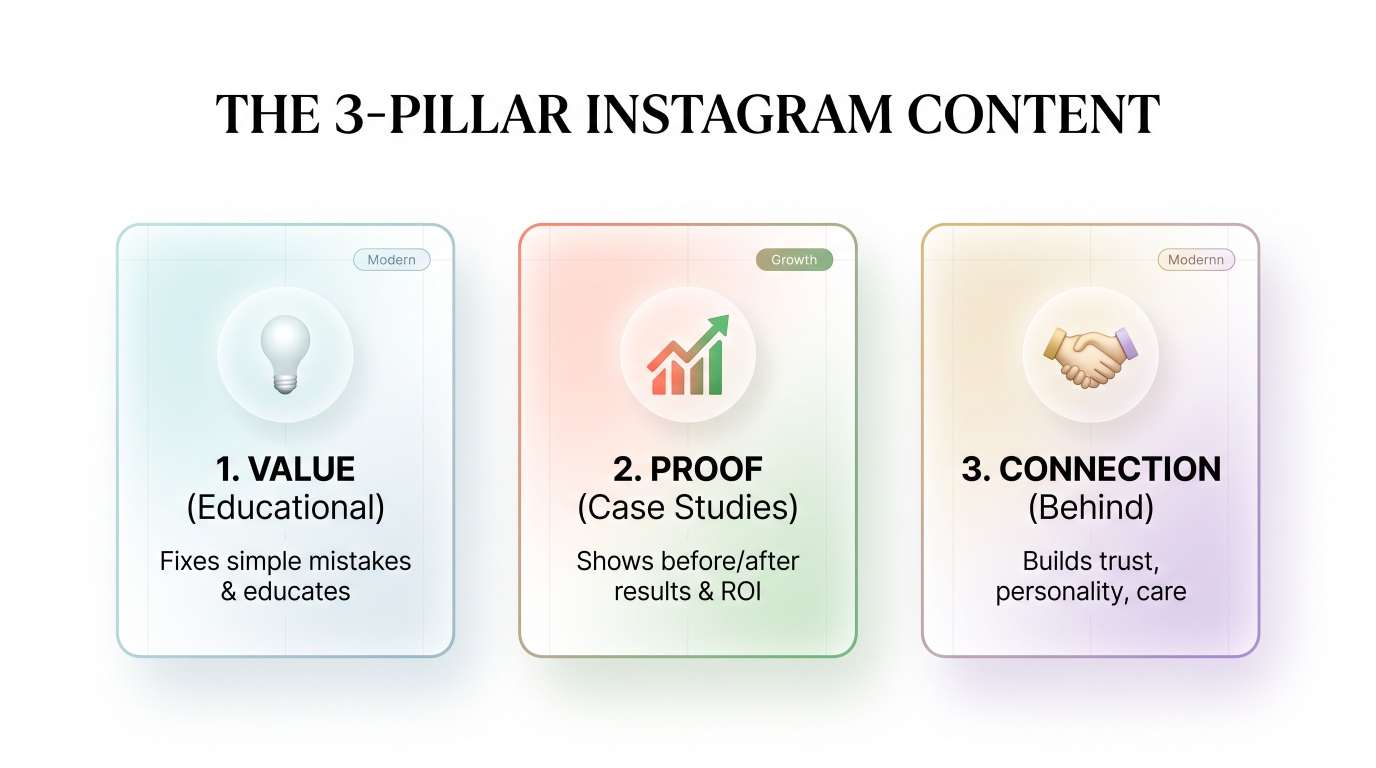
Pillar 1: Value Content (Solve Small Problems in Public)
Value content proves that you know what you are doing. But do not talk like a developer giving a lecture on code syntax. Talk like a business partner.
Business owners do not care about CSS grid systems, database schemas, or JavaScript libraries. They care about:
Does the site load fast on a phone?
Can a customer find the phone number in two seconds?
Does the checkout button work without errors?
Great Content Ideas for Value Posts:
"3 reasons your local service website is getting visits but zero calls."
"Why a slow homepage is losing you money every weekend (and how to test your speed)."
"The 5 things every restaurant website must have on the front page."
"Why you should never put a giant image on your mobile header."
When you share tips like this in a short Reel or a carousel post, business owners think: "Wow, this person knows what they are talking about. My current site has that exact issue."
Pillar 2: Proof Content (Before and After Breakdowns)
Nothing builds trust faster than visual proof. Web design is inherently visual, which makes Instagram the absolute best platform for it.
Whenever you finish a project—or even when you do a redesign of an existing public site for practice—post a side-by-side comparison:
Slide 1: The old website (cluttered text, bad colors, no clear call to action).
Slide 2: The new website you created (clean layout, easy-to-read text, obvious booking button).
Slide 3: The breakdown of changes:
"We made the headline clear so visitors know what the business does immediately."
"We simplified the contact form from 10 fields down to 3 fields."
"We compressed the images so the page loads in 1.2 seconds instead of 6 seconds."
This shows your thinking process. You are not just making things pretty; you are helping businesses grow.
Pillar 3: Connection and Behind-the-Scenes
People buy from people they like and trust. Show the human behind the screen.
Share a quick story about a challenge you solved for a client.
Post a photo of your desk setup on your Instagram Stories.
Share a quick thought about why you love working with small local businesses.
Keep it real and down-to-earth. When potential clients feel like they know you, reaching out to you in the DMs feels safe and natural.
Step 4: Mastering Formats — Reels, Carousels, and Stories
In 2026, Instagram rewards creators who use the platform's features for their intended purposes. Here is how each format fits into your web design client pipeline:
Format | Purpose in Your Client Pipeline | Best For |
Reels | Top of the funnel (Reach new strangers) | Short audits, quick tips, screen recordings of redesigns |
Carousels | Middle of the funnel (Nurture interest) | Step-by-step guides, deep-dive teardowns, before/after comparisons |
Stories | Bottom of the funnel (Convert followers to DMs) | Daily updates, client feedback, quick polls, direct calls to action |
How to Make Reels Without Being an Influencer
A lot of web designers freeze up because they do not want to talk to a camera. You don't have to!
Try these simple Reel formats:
The Screen Recording Teardown: Open a website on your laptop. Record your screen while you scroll through it and use a simple voiceover: "Here are three quick things I would change on this homepage to get more leads..."
The Fast Workflow Reel: Record a quick time-lapse video of you building a layout in Figma, Webflow, or WordPress, set to calm background music, with helpful text tips on the screen.
The Micro-Tip Reel: Show a clean before-and-after toggle of a mobile menu design, explaining why the second version works better for users with thumbs.
Keep your videos under 45 seconds. Get straight to the point in the first 3 seconds. No long introductions!
Step 5: The Outbound Strategy — How to Find and Message Potential Clients
Posting great content is only half the battle. If you just sit back and wait for clients to come to you, it could take months.
If you want to know how to get web design clients on Instagram in 2026 quickly, you must combine your content with proactive outbound networking.
Notice we said networking, not spamming.
Nobody likes getting copy-pasted messages that say:
"Hello dear, I am a professional web developer with 8 years experience, hire me for your website."
That goes straight to the trash folder or gets reported as spam. Instead, use what we call the Value-First Connection Method.
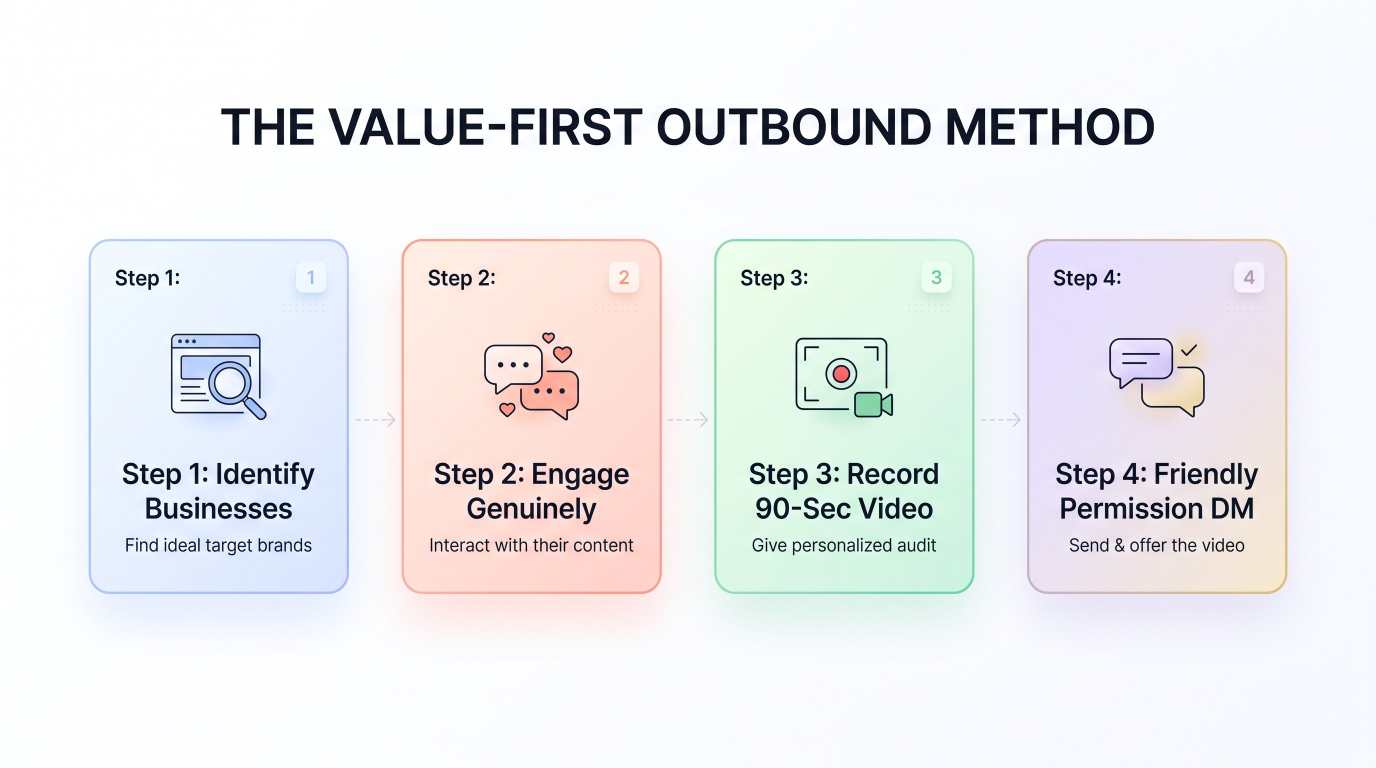
1. How to Find Ideal Prospects on Instagram
Use location tags and industry hashtags to find active businesses:
Search places: Type in your city or target cities (e.g., "Austin, Texas", "Manchester, UK", "Sydney, Australia").
Search categories: Look up "Austin Landscaping", "Chicago Dental Studio", "Denver Roofing".
Look at their profile link: Do they have a website listed? Click it on your phone.
Notice simple flaws: Is the site pinching on mobile? Is the text hard to read? Does the contact form fail to load? Is the copyright date still 2018?
If they are actively posting on Instagram, it means they care about their marketing and likely have a budget. If their website is outdated, they are a prime candidate for an upgrade.
2. Warm Up the Relationship First
Do not pitch on day one.
Follow their page.
Like two or three of their recent posts.
Leave a genuine, thoughtful comment on one of their updates (e.g., "That recent kitchen renovation looks incredible, love the tile work!").
This makes your name familiar. When you eventually send a direct message, you are not a total stranger.
3. The 90-Second Free Audit (The Secret Weapon)
The most respectful, effective way to reach out in 2026 is by offering a quick, free video audit.
Record a quick screen-share video using a free tool like Loom. Keep it under two minutes:
Be polite and compliment their business first.
Point out one or two quick visual or mobile fixes that could help them get more calls.
Show how easy it is to fix.
Close by saying: "No pressure at all, just wanted to share this in case it helps your business! Have a great week."
4. The Exact DM Script to Use
Before sending the video link, always send a quick message to ask for permission. People appreciate courtesy:
"Hey [Name]! Loved your recent post about [mention something specific from their feed]. I was checking out your website on my phone and noticed two quick things on the mobile menu that might be making it hard for customers to call you.
I recorded a quick 90-second video showing how you can easily fix it. Would it be okay if I sent the link over? No sales pitch at all—just hope it helps!"
Why does this work so well?
It is personalized. They know it is not a bot.
You ask permission instead of dumping an unwanted link.
You offer free help before asking for a single dollar.
When they say "Sure, send it over!", send the link. More than half the time, they will thank you, and many will ask: "Can you help us fix this? How much would you charge?"
Step 6: How to Close the Deal in the DMs Without Being Pushy
Once a potential client replies and shows interest, your goal is simple: move the conversation from Instagram DMs to a quick, comfortable video or phone call.
Do not try to explain a 20-page proposal inside a chat window.
Transitioning to a Discovery Call
When they ask about pricing or mention they need help, say something friendly like:
"I would love to help you with that! Every website project is a little different depending on what features you need (like online booking, forms, or custom pages).
Are you free for a quick 15-minute chat on Zoom this Thursday or Friday? We can look over your goals, and I can give you an exact price and timeline."
Give them two clear day options. Provide a direct link to your booking calendar if they prefer picking their own time.
How to Run a 15-Minute Discovery Call
On the call, do not spend the whole time talking about yourself. Ask simple, helpful questions:
"What is the main goal for your new website over the next 6 months?"
"What do customers usually complain about when using your current site?"
"Who is your ideal customer, and what action do you want them to take when they land on the page?"
Listen carefully. Take notes. Then summarize what they need and give them a clear project scope.
When you present yourself as a calm, helpful consultant rather than a pushy salesperson, closing deals becomes a smooth, comfortable conversation.
Step 7: A Simple 30-Day Action Plan for Beginners
Reading about getting clients is easy; taking action every day is what actually produces results.
Here is a straightforward 30-day checklist you can follow starting today:
YOUR 30-DAY ACTION CHECKLIST
WEEK 1: Profile & Positioning
Clean up username and profile photo
Optimize bio and name field for Instagram SEO
Pick your primary niche
Set up your single portfolio/booking link
WEEK 2: Content Foundation
Post 3 Reels (website audits, quick redesign tips)
Post 2 Carousels (step-by-step design breakdowns)
Post 3 to 5 daily Instagram Stories showing your work routine
WEEK 3: Active Networking
Find 30 active small businesses in your niche
Follow and leave genuine comments on their posts
Prepare 5 short Loom video audits for websites that need real help
WEEK 4: Outreach & Discovery Calls
Send polite permission-based DMs to those 5 businesses
Share videos when they say yes
Book discovery calls and send simple proposals
Review what worked and repeat the process for next month
Ready to streamline your client pipeline? Pair your Instagram outreach with GoodlyCRM to automate your email follow-ups and manage all your design leads in one clean workspace. Get started for free here →
Frequently Asked Questions (FAQ)
Do I need a huge follower count to get web design clients on Instagram?
No. You do not need thousands of followers. In fact, many freelance designers land $2,000 to $5,000 projects with fewer than 300 followers. What matters is having a clear profile, proof of your skill, and reaching out to the right business owners directly.
What should I do if I don’t have any client projects for my portfolio yet?
Create concept redesigns! Pick a real local business that has a poor website. Redesign their homepage inside Figma, Webflow, or WordPress as a practice project. Post the before-and-after breakdown on your Instagram feed. Be honest that it is a concept redesign. Clients care about your skills and problem-solving ability, not just past invoices.
How much should I charge for a website when starting out on Instagram?
For a clean, 3-to-5 page website for a local service business, starting between $1,000 and $2,500 is very common in 2026. As you collect more case studies and client reviews, you can comfortably raise your prices to $3,500, $5,000, or more per project.
Is Instagram better than LinkedIn or cold email for web design?
Instagram is uniquely powerful because web design is visual. On Instagram, you can show an instant before-and-after photo or video that catches a business owner's eye while they are relaxed and scrolling. Combining Instagram with LinkedIn or email gives you an even stronger pipeline.
Final Thoughts: Consistency Beats Perfection
Learning how to get web design clients on Instagram in 2026 is not about finding a magic trick or gaming an algorithm.
It comes down to three basic habits:
Make it immediately obvious that you build high-performing websites.
Share practical, easy-to-understand content that helps business owners solve real problems.
Start friendly, helpful conversations in the DMs every single week.
If you follow this plan consistently for 30 to 60 days, you will not just get random inquiries—you will build a steady, predictable pipeline of web design clients who value your work and happily pay your rates.
Open up your Instagram app, clean up your bio, and send your first helpful audit today!
Ready to grow your business?
Contact us today to find out how our strategies can scale your operations to the next level.
Contact Us