How to Get Your First Client on YouTube Without Running Ads
Getting your very first paying client feels impossible when you sit at zero subscribers. You look around, and every major creator tells you to run paid ads, spend thousands on software, or wait two years until the algorithm blesses your channel.
None of that is true.
You do not need 100,000 subscribers to make a full-time income. You do not need thousands of views per video. In fact, you can land high-ticket service clients, agency projects, consulting gigs, or freelance contracts with fewer than 100 views per upload.
Why? Because YouTube is not just social media; it is the second-largest search engine on earth. When people search on YouTube, they have real, immediate problems. If your video solves that problem and shows you know your craft, viewers do not care about your subscriber count. They care about results.
Here is the exact, step-by-step blueprint on how to get your first client on YouTube without running ads, built from real-world testing and zero ad spend.
The Mindset Shift: Views vs Qualified Buyers
Before recording a single second of footage, you must understand one simple rule:
You are not building an entertainment channel. You are building an inbound client pipeline.
Entertainment creators need millions of views because they get paid pennies per view from ad revenue. When you sell a service, web design, custom software, digital marketing, video editing, or business consulting, you only need one person to watch, trust you, and book a call.
Metric | AdSense Creator | Client Acquisition Creator |
Primary Goal | Viral reach and high watch time | High-intent problem solving |
Target Audience | Everyone (broad appeal) | Specific business owners and buyers |
Key Metric | Millions of views | Lead conversion and booked calls |
Revenue Source | Platform ad split | High-ticket service retainers |
Views Needed to Make $3,000 | 1,000,000+ views | 100 targeted views |
When you stop chasing viral numbers and start hunting for buyers with specific pain points, YouTube becomes the easiest client acquisition channel you will ever use.
Phase 1: Define the One Problem You Solve
The biggest mistake new creators make is talking about everything. On Monday, they post a video about productivity. On Wednesday, they review a microphone. On Friday, they share marketing tips.
Nobody hires a generalist for high-ticket work. Businesses hire specialists who solve expensive headaches.
1. The Single Client Formula
To land clients quickly, fill out this exact sentence:
"I help [specific person] achieve [specific outcome] through [specific service] without [biggest fear]."
Weak example: "I make websites for businesses."
Client-generating example: "I build fast, high-converting booking systems for dental clinics without monthly subscription fees."
When a local clinic owner searches for booking problems and finds your video, they instantly think: This person built this specifically for me.
2. Find High-Intent Keyword Searches
Do not guess what people want. Look at what they already type into search bars. High-intent keywords usually contain action words:
"How to fix..."
"Best way to build..."
"How to set up..."
"Tutorial for beginners..."
"Review and comparison..."
Open YouTube in an incognito window. Type your core skill, add a space, and see what autocomplete suggests. Those suggestions represent real people looking for real solutions right now.
Phase 2: Set Up Your Channel as a 24/7 Sales Funnel
Your channel page should never look like a casual video hobby. It needs to function like a clean, professional landing page. When an interested viewer clicks your channel name, they must understand who you are and how to work with you within five seconds.
Channel Layout Blueprint:
Header Banner: Clear Value Proposition + Work With Me call-to-action
Profile Header: Avatar, Channel Name, and a single sentence explaining who you help and the outcome delivered
Primary Link: Free Consultation or Contact button
Featured Spot: Case Study or your best problem-solving video
Organized Playlists: Direct tutorials and step-by-step how-to guides
The Channel Banner
Your banner should feature three simple elements:
Clear headline: State who you help and the result you deliver.
Social proof or specialty: Mention your primary software, stack, or field.
Call to action: Point directly to your channel header link (e.g., "Book a free strategy audit below").
Keep the background clean, high-contrast, and easy to read on mobile devices.
The "About" Section and Links
Your About tab is your mini sales page. Structure it with simple bullet points:
Who you are and what you do.
Real results or problems you have solved.
Who should reach out to you.
A direct email address for business inquiries.
A direct link to a calendar booking page (like Calendly) or a simple contact form.
Phase 3: The 4 Video Styles That Attract Paying Clients
You do not need 50 videos. You need 5 to 10 strategic assets that work like round-the-clock sales reps. Focus on these four specific video formats:
1. The Screen-Share "Over-the-Shoulder" Tutorial
Do not just explain concepts with talking head videos. Open your screen and show the actual work.
If you are a web developer, build a specific feature live. If you manage ads, walk through campaign setup. If you write copy, break down a real sales page line by line.
Why it converts: Anyone can claim they understand a skill. Showing your screen proves competence instantly. It eliminates skepticism before the prospect even talks to you.
2. The Teardown or Audit
Pick an existing, public business asset (a slow website, an unoptimized sales funnel, a broken email sequence) and politely review how to fix it.
Show what hurts their conversion rate, explain why it happens, and demonstrate the exact solution you would implement.
Why it converts: Potential clients watching the video will see their own mistakes reflected on screen. They will realize they do not have the time or technical skill to fix it themselves, making you the natural hire.
3. The Tool Comparison and Tech Stack Breakdown
Decision-makers research software and tool stacks before spending money. When they search comparisons like “Tool A vs Tool B for Small Business”, they hold a credit card in hand.
Explain the trade-offs honestly. Recommend the best fit for specific business sizes, and offer your integration service at the end.
4. The Mini Case Study
Even if you have not had a formal client yet, build a personal project or solve a problem for a friend. Document the journey:
The starting problem
The plan of action
The implementation process
The final outcome and data
Case studies convert lurkers into paying prospects faster than any other video format.
Phase 4: Scripting for Conversions (The Trust Framework)
Most YouTube retention advice focuses on keeping teenagers hooked on entertainment. When targeting business clients, you do not need jump cuts, flashing graphics, or sound effects every three seconds. You need clarity, respect for their time, and real value.
Here is a simple structure to follow for every upload:
1. The Direct Hook (First 15 Seconds)
State the exact problem you will solve immediately. Do not waste time with long animated intros or generic pleasantries.
"In this video, I will show you how to set up an automated lead capture system without paying expensive monthly software subscriptions. Let us jump right in."
2. The Context and Cost of the Problem (30 to 60 Seconds)
Explain why this problem costs the viewer money, time, or peace of mind. When viewers feel understood, they stay to hear the solution.
3. The Step-by-Step Execution (Main Body)
Deliver the solution without holding back secrets.
A common fear among beginners is: "If I give away the solution for free, why would anyone hire me?"
In the professional service world:
Beginners watch tutorials to do it themselves.
Busy business owners watch tutorials to verify that you know what you are doing, so they can pay you to do it for them.
Giving away top-tier tactical knowledge attracts high-budget clients who value their own time over DIY tinkering.
4. The Soft, Solution-Oriented Call to Action (CTA)
Never beg for likes, bell notifications, and comments at the same time. Direct all viewer attention toward one single action: reaching out to you.
"You can follow these steps and implement this yourself using the exact workflow shown on screen. But if you run a busy team and want us to build, test, and deploy this custom system for you, click the first link in the description to schedule a quick 15-minute discovery call."
Phase 5: Simple Video Production That Builds Real Authority
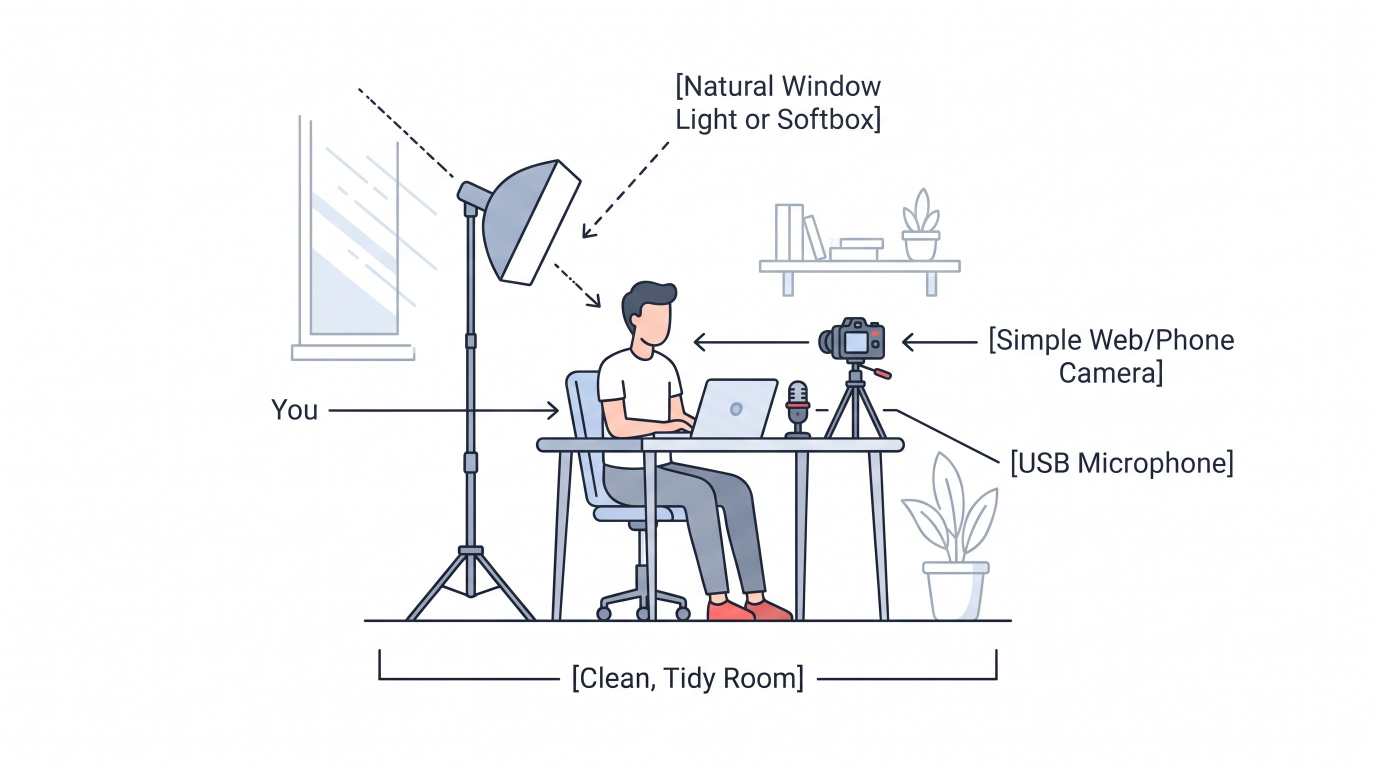
You do not need a cinema camera or an expensive studio. High-end clients care about two things: clear audio and clean visuals.
Video Equipment Rules
Audio comes first: Viewers will tolerate average video quality, but bad, echoing audio will make them click away within seconds. Use a simple USB dynamic microphone placed close to your mouth.
Lighting: Sit facing a window or use a basic softbox light placed at a 45-degree angle. Clear, bright lighting immediately elevates production quality.
Screen recording: Use free, reliable tools like OBS Studio to record crisp 1080p screen-shares.
Clean presentation: Keep desktop folders hidden, close unnecessary browser tabs, and set your display resolution so text stays crisp and easy to read on mobile screens.
Professionalism comes from clarity, not flashy special effects.
Phase 6: YouTube SEO to Rank Without an Existing Audience
When you have zero subscribers, the YouTube homepage will not recommend your videos right away. You must rely on search discovery. Optimizing your videos correctly lets you capture steady search traffic month after month.
1. The Video Title
Place your primary search keyword at the front of your title. Keep it clean and natural:
Format:
[Primary Keyword]: [Clear Benefit or Solution]Example:
How to Get Your First Client on YouTube Without Running Ads (Step-by-Step)
2. The Video Description
Write a helpful, 150-to-250-word summary explaining what the video covers.
Put your primary call to action and booking link in the first two lines so it shows above the "Show more" fold.
Naturally weave in your main keywords and related phrases.
Add clickable timestamps. Timestamps help busy business owners jump straight to their pain point, and Google indexes them directly into web search results.
3. Clear, High-Contrast Thumbnails
Avoid dramatic facial expressions or clickbait graphics. Professional buyers respond best to clean, trustworthy designs:
Use 3 to 5 words of large, legible text that complements (rather than repeats) the title.
Include a screenshot of the actual result, tool dashboard, or clean workflow.
Use strong contrast with plain backgrounds so the image stands out on dark and light themes.
Phase 7: The Direct Outreach Strategy (The Fast Track)
Waiting for search rankings can take a few weeks. If you want to land your first client within 14 days, pair your YouTube videos with targeted direct outreach.
Instead of sending cold, spammy sales messages that get ignored, use your video as a high-value gift.
Step 1: Identify 20 businesses with an obvious, fixable bottleneck.
Step 2: Record a dedicated video solving that exact bottleneck.
Step 3: Send a brief, zero-pressure email sharing the video link.
Step 4: Prospect watches -> Sees proof of skill -> Books consultation call.
The "No-Pitch" Outreach Template
Subject: Quick question regarding [Specific Problem on their site/app]
Hi [First Name],
I was looking at your [website / current workflow / marketing system] and noticed a small issue with [mention specific bottleneck, like slow checkout or missing mobile layout].
I actually recorded a quick, unlisted YouTube video showing the exact issue and how your team can fix it in about 15 minutes:
[Link to your helpful video]
No pitch here; just wanted to pass it along in case it helps your team fix it quickly.
Best regards,
[Your Name]
[Your Title / Link to Channel]
When you send a helpful video instead of an aggressive sales pitch, prospects appreciate the effort. Even if they don't hire you immediately, they often reply with gratitude, subscribe to your channel, and keep you top of mind when budget opens up.
What to Do Once a Prospect Books a Call
When your video funnel works and an inquiry arrives on your calendar, do not turn into a pushy salesperson. Run the discovery call like an expert consultant:
Ask clarifying questions: Let them explain their current bottlenecks and business goals.
Listen 70% of the time: Take notes on the exact language and phrases they use to describe their frustrations.
Connect the solution: Explain how your service solves the bottleneck, referring back to the framework shown in your video.
Offer a clear, fixed-scope proposal: Outline what you will build, the completion timeline, and the investment required.
Because they watched your video before booking, trust is already established. They know your voice, your process, and your competence. You are closing warm inbound leads, not cold prospects.
Summary Checklist to Land Your First Client
Pick one painful problem and identify the exact business owner who needs it resolved.
Find high-intent search terms using YouTube autocomplete and search suggestions.
Set up your channel profile as a clean, focused landing page with a direct booking link.
Publish 3 to 5 screen-share tutorials or workflow audits that solve real issues end-to-end.
Add a clear, low-pressure call to action in every video inviting qualified viewers to book a call.
Use clean SEO practices (descriptive titles, informative descriptions, and timestamps).
Share your videos directly with prospects who have the exact problem you solved.
Commit to this system consistently. It takes only one high-value client to validate your process, cover your tools, and kickstart a sustainable service business powered entirely by free organic video.
Get your first (and next) client on YouTube with our team.
Let us build your automated client acquisition funnel for you.
Click here to see if you qualify to work with us
Ready to grow your business?
Contact us today to find out how our strategies can scale your operations to the next level.
Contact Us