Best Project Management SaaS Tools to Boost Team Productivity in 2027

If you run a business or lead a team today, you already know one hard truth: keeping everyone on the same page is messy.
You start your morning with five unread Slack threads. Two people ask for the same file link. Someone finishes a task that nobody asked for, while an urgent client deadline slips right under the radar. By lunch, your team has spent four hours talking about work instead of actually doing it.
That is why choosing the right software matters so much.
In this complete guide, we break down the best project management SaaS tools to boost team productivity in 2027. We have tested these platforms in real workflows with remote teams, software engineers, marketing departments, and client service agencies.
No confusing buzzwords. No tech jargon. Just plain, honest facts about what works, what costs too much, and how to pick the setup that makes your workday smooth and stress-free.
Quick Comparison: Top Tools at a Glance
SaaS Tool | Best For | Standout Strength | Starting Price |
ClickUp | All-in-one workflows | Highly flexible, docs and tasks combined | Free / $7 user/mo |
Visual team boards | Easy to learn, beautiful dashboard UI | Free / $9 user/mo | |
Asana | Cross-department work | Clear dependencies and workload balance | Free / $10.99 user/mo |
Linear | Software and engineering | Lightning-fast keyboard shortcuts, issue tracking | Free / $8 user/mo |
Basecamp | Calm communication | Flat pricing, message boards, no clutter | $15 user/mo or $299 flat |
Notion | Knowledge base + projects | Infinite page customization, linked databases | Free / $8 user/mo |
Jira | Agile enterprise IT | Deep sprint planning, code repo links | Free / $7.75 user/mo |
What Makes a Project Management SaaS Tool Great in 2027?
A few years ago, a digital board with three columns (To Do, Doing, Done) was enough. Today, work moves much faster. If your tool requires thirty manual clicks just to log a finished task, your team will stop using it within two weeks.
When we evaluate software to boost team productivity, we look at four simple pillars:
1. Speed and Simplicity
The software must load instantly. When an employee opens their laptop, they should see their personal task list within three seconds. If a tool feels sluggish or looks like an airplane cockpit, people avoid it.
2. Smart Work Automation
Nobody wants to spend their afternoon moving cards from one column to another or sending manual reminder emails. A top-tier tool in 2027 handles basic routine work quietly in the background:
Notifying the next person when a draft is ready.
Changing task status when a client signs off.
Auto-assigning tasks based on team capacity.
3. Clear Communication Without the Noise
Good project management tools keep the conversation attached to the task itself. You should never have to jump between four different chat apps to find feedback on a single graphic banner or software bug.
4. Fair and Transparent Pricing
Many SaaS tools lure you in with a cheap starter plan, then charge triple once you need basic features like timeline views, export reports, or guest accounts for your clients. We value platforms that give you real power without hidden price traps.
Deep Dive: The 7 Best Project Management SaaS Tools
Let us take a close look at each platform. We cover what makes each tool special, where it falls short, and the exact type of team it suits best.
1. ClickUp: The Swiss Army Knife for Busy Teams
ClickUp aims to replace every other app on your desktop. It combines tasks, documents, chat, whiteboards, goals, and time tracking inside a single dashboard.
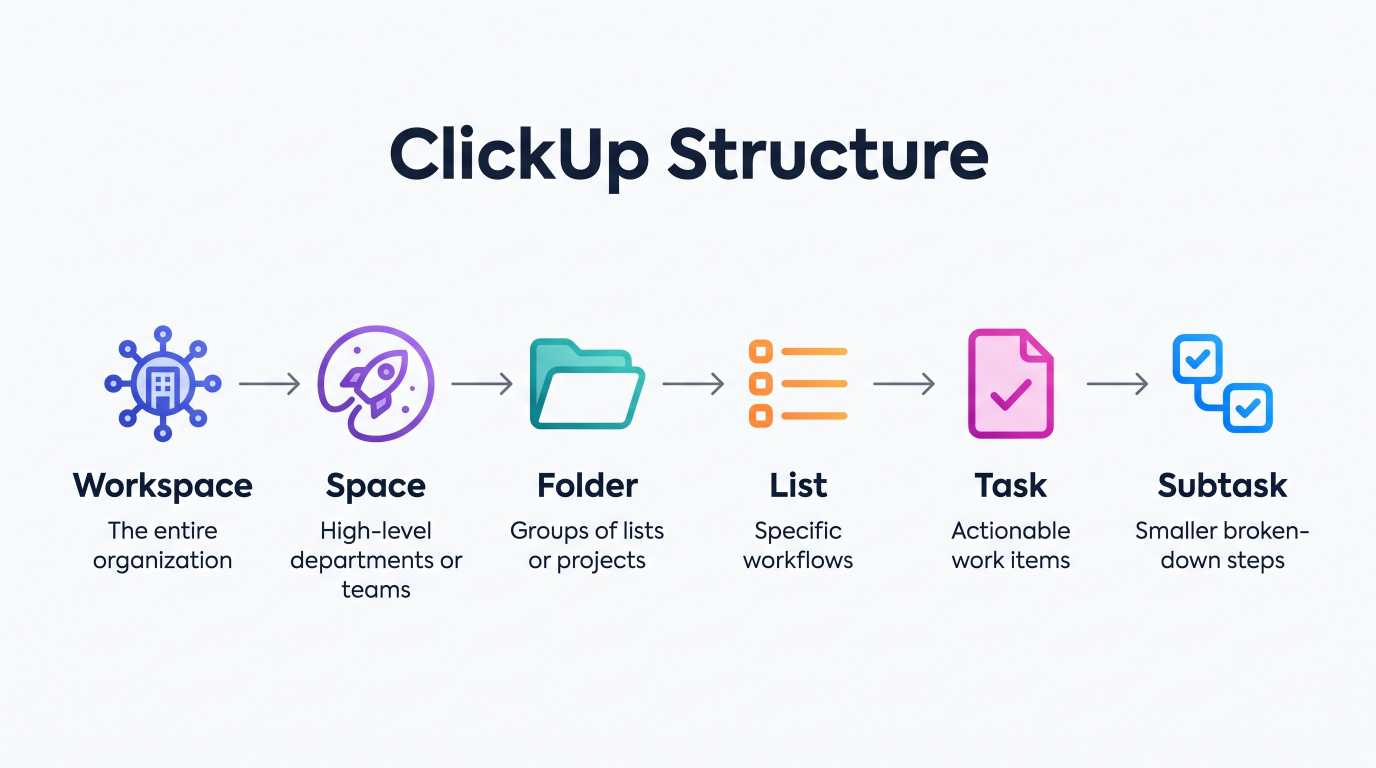
Why Teams Love ClickUp
ClickUp gives you total control over how you see your work. If your graphic designer likes Kanban boards, they can use Kanban. If your financial manager prefers spreadsheets, they can view the exact same data in a table view. If your project manager needs Gantt charts with strict dependencies, it takes one click to switch.
Where It Struggles
Because ClickUp does almost everything, the initial setup can feel overwhelming. New team members often need a week or two to understand the difference between Spaces, Folders, and Lists. If you do not set strict internal rules for your team, your workspace can become cluttered quickly.
Pricing
Free Forever: Generous features, best for solo users or tiny teams testing the waters.
Unlimited Plan: $7 per user per month (billed annually). Unlocks unlimited storage, integrations, and dashboards.
Business Plan: $12 per user per month. Adds advanced time tracking, workload management, and custom export options.
Verdict
ClickUp is our top recommendation for teams that want one single software tool to run their entire operation without paying for five different subscriptions.
2. Monday.com: The Most Visual and User-Friendly Option
If you hand Monday.com to someone who has never touched project management software before, they will understand how to use it within thirty minutes. It is colorful, clean, and built around visual satisfaction.
Monday.com Board Layout:
[Task Name] -> [Owner Face] -> [Status: In Progress] -> [Due Date] -> [Priority]
Why Teams Love Monday.com
The color-coded boards make status updates instant. A manager can glance at a screen for ten seconds and know whether a campaign is on track or falling behind. Their automation builder uses plain English phrases like "When status changes to Approved, move item to Finished group and notify Sarah." You do not need any coding knowledge to build powerful routines.
Where It Struggles
Monday.com enforces a minimum user-seat requirement on paid plans (usually sold in packs of 3, 5, or 10 seats). If you are a team of four, you might find yourself paying for five seats. Furthermore, advanced reporting and time tracking are locked behind their higher-tier pricing plans.
Pricing
Free Plan: Up to 2 users, basic boards only.
Basic: $9 per seat per month. Unlimited boards, 5GB storage.
Standard: $12 per seat per month. Adds timeline views, calendar views, and 250 automation actions per month.
Pro: $19 per seat per month. Unlocks private boards, chart views, and formula columns.
Verdict
Monday.com is the best pick for marketing teams, creative agencies, and operations departments that want a bright, easy-to-learn system that everyone actually enjoys opening every morning.
3. Asana: The King of Cross-Department Coordination
Asana is built for medium-to-large companies where multiple departments need to hand off work cleanly without dropping the ball.
Why Teams Love Asana
Asana excels at showing who is doing what, by when. Its workload management feature lets team leads see if one designer has ten open tasks this week while another has only two. This balance prevents team burnout before it happens. Its timeline view is smooth, intuitive, and handles shifting deadlines effortlessly.
Where It Struggles
Unlike ClickUp or Notion, Asana is not a great place to write long, detailed internal documents or company wikis. You will still need an external tool like Google Docs or Notion to write manuals and process guides. The free plan is also more restrictive than it used to be.
Pricing
Personal (Free): Up to 10 teammates with basic list and board views.
Starter: $10.99 per user per month. Unlocks timeline view, workflow builder, and basic automated rules.
Advanced: $24.99 per user per month. Designed for scaling companies needing workload tracking and advanced approvals.
Verdict
If your company has distinct marketing, product, sales, and design departments that need a reliable handoff system, Asana is a rock-solid, enterprise-tested platform.
4. Linear: Built for Speed and Software Developers
If your team builds digital products, mobile apps, or web platforms, standard project management tools often feel bloated and heavy. Linear was designed from the ground up to fix that exact problem.
Why Teams Love Linear
Linear is blisteringly fast. Almost every single action can be done with keyboard shortcuts. It syncs directly with GitHub, GitLab, and developer pull requests. When a developer closes a code branch, the corresponding task card moves to completed automatically. There are no distracting colors, widgets, or unnecessary buttons.
Where It Struggles
Linear is strictly designed for modern software development cycles (cycles, sprints, roadmaps, and bug backlogs). It is not well-suited for social media schedules, general human resources tasks, or basic office admin work.
Pricing
Free: Up to 250 active issues, unlimited members.
Standard: $8 per user per month. Unlimited issues, file uploads up to 250MB, and custom roadmaps.
Plus: $15 per user per month. Adds advanced security, SLA tracking, and priority support.
Verdict
For tech startups, development houses, and engineering teams, Linear is widely considered the cleanest issue-tracking and sprint tool on the market today.
5. Basecamp: The Antidote to Workplace Stress
Most modern tools send you dozens of notification pings every hour. Basecamp takes the opposite philosophical approach: work should be calm, organized, and free of panic.
Inside a Basecamp Project:
[Campfire Chat] [Message Board] [To-Dos] [Docs & Files] [Schedule] [Automatic Check-ins]
Why Teams Love Basecamp
Instead of endless task micro-management, Basecamp organizes work into simple project rooms. Each room has six basic tools: a message board for big announcements, a to-do list, a document locker, a campfire chat for casual talk, a schedule calendar, and automated daily check-ins (such as "What did you work on today?").
Best of all, Basecamp offers a predictable flat-rate pricing model that large teams appreciate.
Where It Struggles
If you need deep Gantt chart dependencies, complex custom field calculations, or time-tracking billing for client hours, Basecamp will feel too basic. It does not force workflows; it relies on your team to communicate responsibly.
Pricing
Basecamp (Per User): $15 per user per month. Pay only for the team members you have.
Basecamp Pro Unlimited: $299 per month flat (billed annually). Unlimited users, 5TB storage, and VIP support. No per-seat penalties.
Verdict
Basecamp is ideal for remote companies that value clear written communication over chaotic daily meetings and task micromanagement.
6. Notion: The Ultimate Workspace for Docs and Systems
Notion started as a note-taking app, but it has grown into a powerhouse for custom internal systems. With its relational database features, you can build a project management system shaped exactly like your business.
Why Teams Love Notion
Every single page inside Notion is an open canvas. You can embed a task board right below a project brief, link that board to your client database, and attach your brand guidelines on the same screen. It acts as both your company library and your daily task manager.
Where It Struggles
Because Notion gives you an empty page to start, you have to design your own structure or rely on templates. It lacks native advanced automations out of the box compared to ClickUp or Monday.com, and large databases can become slow if not maintained cleanly.
Pricing
Free: Unlimited blocks for individuals, basic trial for teams.
Plus: $8 per seat per month. Unlimited blocks, unlimited file uploads, up to 100 guest invites.
Business: $15 per seat per month. Private team spaces, advanced database permissions, and analytics.
Verdict
Notion is unmatched for startups, agencies, and content teams that want their documentation, notes, and task lists living in one interconnected home.
7. Jira: The Heavyweight Enterprise Standard
Jira by Atlassian is the veteran in this space. While often debated due to its complexity, it remains the standard choice for enterprise IT departments, corporate agile frameworks, and large engineering teams.
Why Teams Love Jira
If you run strict Scrum or Kanban sprints across hundreds of developers, Jira offers reporting metrics that other tools cannot match. Burndown charts, velocity tracking, release roadmaps, and bug management connect directly into Atlassian's broader ecosystem, including Confluence and Bitbucket.
Where It Struggles
Jira can feel rigid, complex, and slow to navigate. It usually requires a dedicated system administrator to configure issue types, permission schemes, and screen layouts properly. Non-technical staff often find it frustrating to use for general marketing or creative tasks.
Pricing
Free: Up to 10 users with basic board functionality and 2GB storage.
Standard: $7.75 per user per month. User roles, audit logs, and 250GB storage.
Premium: $15.25 per user per month. Global multi-project automations, 24/7 support, and unlimited storage.
Verdict
Jira is the right choice for enterprise companies that need deep agile reporting, compliance auditing, and established IT security standards.
The Hidden Trap of Standard SaaS Tools (And Why Many Businesses Outgrow Them)
While all the tools listed above are impressive, relying on three or four separate SaaS subscriptions comes with hidden costs that many founders do not calculate early on:
The Subscription Tax: Paying $12 per user for project management, $15 per user for email marketing tools, $20 per user for a CRM, and $10 for file storage adds up quickly. A team of twenty can easily spend $1,000 to $1,500 every single month just on basic software access.
Data Fragmentation: Your customer data sits in your CRM, your active delivery work sits in your project manager, and your marketing metrics sit in your email tool. When your systems cannot talk to each other cleanly, your team ends up copying and pasting data manually between tabs.
Lack of Custom Fit: Off-the-shelf software forces you to change your workflow to match their software. If you have a specific business model, custom pricing rules, or automated client delivery steps, standard tools often hit a wall.
Need a Tailored System That Fits Your Exact Workflow?
If you are tired of juggling separate monthly subscriptions for your leads, marketing campaigns, and internal tasks, take a look at GoodlySoft. We develop custom web applications and offer an all-in-one custom CRM and marketing automation platform built with modern tech like Laravel and React. It brings your email marketing campaigns, lead tracking, and internal project tasks into one secure, unified dashboard without recurring per-seat headaches.
How to Choose the Best Tool for Your Team
To make your decision simple, follow this practical elimination checklist:
Team Need Analysis:
1. Are you pure software engineers? -> Choose Linear or Jira.
2. Do you want one app for docs, tasks, and chat? -> Choose ClickUp.
3. Do you want visual simplicity and fast team adoption? -> Choose Monday.com.
4. Do you need custom wikis and linked databases? -> Choose Notion.
5. Do you prioritize calm communication and flat pricing? -> Choose Basecamp.
Step 1: Count Your Real Users
Be honest about who actually needs a full account. If your team only has five core managers but twenty freelance contributors, look for a tool that offers free or low-cost guest seats (like ClickUp or Notion). This choice alone can cut your software bill in half.
Step 2: Test With a Real Project (Not a Dummy Test)
Do not test a tool by creating three fake cards called "Test Task 1." Instead, take one real upcoming client project or internal campaign. Invite two teammates, build out the actual milestones, and run your work inside the tool for seven full days. You will know within forty-eight hours whether the tool feels natural or frustrating.
Step 3: Check Mobile App Performance
Your team will not always sit at their office desks. They will approve tasks from coffee shops, check project statuses on the train, and answer urgent questions from their phones. Make sure the mobile app version of your chosen SaaS tool is fast, clean, and bug-free.
5 Practical Habits to Double Your Team Productivity in 2027
Software is only as good as the habits of the people using it. Even the most expensive project management software will fail if your team does not follow basic operational hygiene. Here are five simple rules that protect your team's focus:
1. If It Is Not in the Tool, It Does Not Exist
Kill the habit of assigning work in hallway conversations, instant messaging chats, or phone calls. When someone asks for a task verbally, teach your team to say: "Please drop it in the project board so it gets scheduled." This simple rule eliminates forgotten deadlines overnight.
2. Every Task Must Have Exactly One Owner
When two people share ownership of a task, nobody owns it. Both assume the other person is handling the details. You can have five people helping as contributors, but assign one single person responsible for moving the card to "Done."
3. Write Clear Task Titles With Action Verbs
Avoid vague task names like "Website Work" or "Client Presentation." Instead, use clear, action-oriented titles:
"Design 3 header banner variations for November sale"
"Review and approve client agreement PDF"
"Audit server logs for checkout latency issue"
A team member should look at the title and understand the definition of done without opening the card.
4. Schedule a Weekly 20-Minute Board Cleanup
Pick one afternoon a week (Friday afternoons work best) to spend twenty minutes archiving completed cards, updating due dates, and clearing out old tasks. A clean board keeps morale high when Monday morning arrives.
5. Limit "Work in Progress" (WIP)
Multitasking is a productivity myth. When employees juggle six tasks at the same time, all six take longer and mistakes multiply. Encourage your team to keep their personal active work column limited to two or three items at any given moment. Finish one, then pull the next.
Frequently Asked Questions (FAQ)
What is the easiest project management SaaS tool to learn?
For general business teams, Monday.com is widely regarded as the easiest platform to pick up quickly due to its colorful, visual layout and intuitive spreadsheet-like feel. For teams that already love writing notes, Notion is also very approachable.
Can a project management tool replace my internal team chat?
For task-specific discussions, yes. It is always better to comment directly on the task card rather than discussing it in a separate chat thread. However, most teams still maintain a lightweight chat app for quick casual check-ins and company-wide watercooler conversations.
Is free project management software good enough for small businesses?
Yes. Platforms like ClickUp, Asana, and Linear offer free tiers that work well for teams with fewer than five to ten members. You generally only need to upgrade to a paid plan when you need advanced automations, deep storage, custom permission controls, or detailed reporting.
How does custom project management software compare to standard SaaS subscriptions?
Standard SaaS platforms offer immediate convenience, but they come with recurring monthly fees per seat that grow indefinitely as your company expands. A custom internal platform gives you total ownership of your source code, direct control over your client data, and an interface tailored around your exact operations without monthly per-user licensing fees.
Final Thoughts: Focus on Output, Not Just Tracking
The primary goal of any project management tool is not to turn your team into software administrators. The goal is to free up your team's mental energy so they can do their best creative, technical, and strategic work.
Pick the tool that matches your team's natural working style. Keep your boards simple, set clear boundaries on notifications, and let the software handle the administrative clutter.
Take Your Digital Operations to the Next Level
Looking to modernize your business systems or build custom software that gives you a true competitive advantage? Explore how GoodlySoft helps businesses automate repetitive work, build scalable web and mobile applications, and implement tailored CRM and marketing systems that drive real growth.
Ready to grow your business?
Contact us today to find out how our strategies can scale your operations to the next level.
Contact Us