Best AI Image Generators for Marketing Teams
If you run marketing for a brand or small business, you already know the everyday struggle.
You need five new ad creatives for Facebook by noon. You need three banner variations for an email blast tomorrow morning. Your blog writer wants an original header visual. And your graphic designer is already buried under product packaging and video editing tasks.
A few years ago, you had two choices: pay hundreds of dollars for stock photos that look fake and cheesy, or wait two weeks for an agency to deliver custom graphics.
Today, AI changes that game completely. But here is the hard truth: most AI image tools are built for digital artists, not marketing teams.
Artists want weird, surreal fantasy worlds. Marketers want clean product photos, realistic people looking at a phone, accurate text on a billboard, brand colors that do not drift, and clear commercial usage rights.
We spent months testing dozens of platforms with real campaigns, social media ads, and landing pages. In this guide, we break down the best AI image generators for marketing teams, what each one does best, where they fall short, and how to pick the right one for your daily workflow.
What Makes an AI Image Tool Great for Marketing?
Before we look at the specific tools, let’s talk about how to evaluate them. A tool might make gorgeous fantasy landscapes, but that does not mean it can help you sell running shoes or SaaS software.
When we test these platforms for real marketing workflows, we look at four simple things:
Text Rendering (Can it spell?): Can the tool put the word "SALE" or "50% OFF" on a sign without turning the letters into alien gibberish?
Brand Consistency: Can you upload your product photo and put it in different scenes? Can you lock your brand color palette?
Speed and Usability: Is it simple enough for a junior copywriter or social media manager to use without learning complex computer code?
Commercial Safety: Can you legally use these images in Google Ads, billboards, and sponsored social posts without copyright headaches?
Keep these four things in mind as we walk through the top options.
Quick Comparison: Top AI Image Generators at a Glance
Tool | Best For | Standout Feature | Learning Curve | Commercial Rights |
Midjourney | Hyper-realistic lifestyle photos | Unbeatable photo quality | Medium (runs on Discord/Web) | Yes (Paid plans) |
Canva Magic Studio | All-in-one social media graphics | Integrates directly into design layouts | Very Easy | Yes |
Adobe Firefly | Brand safety & photo retouching | Trained strictly on licensed stock | Easy | Fully Enterprise Safe |
FLUX.1 | Ultra-realistic details & text | Photorealism and perfect hands/faces | Medium | Yes (via API / Web apps) |
DALL-E 3 (ChatGPT) | Brainstorming & fast concept ads | Understands long, plain English prompts | Very Easy | Yes |
Pebblely | E-commerce product photography | Turns flat product shots into studio scenes | Very Easy | Yes |
Photoroom | Mobile commerce & background swaps | 1-click batch background removal | Very Easy | Yes |
1. Midjourney: Best for Photorealistic Campaign Visuals
If you want an image that looks like a high-budget photoshoot with professional lighting, Midjourney is still the undisputed champion.
Why Marketers Love It
When you look at billboard ads or magazine spreads, the lighting and skin textures look completely natural. Midjourney captures that exact vibe. While older AI models made human skin look like shiny plastic, Midjourney adds tiny pores, real fabric textures, natural shadows, and believable sunlight.
For marketing teams running top-of-funnel lifestyle campaigns—like fitness apparel, travel packages, food, or lifestyle apps—it creates visuals that stop people from scrolling past your ads.
Key Features for Marketing Teams
Style Reference (
--sref): You can feed Midjourney one of your existing campaign photos and tell it, "Make three new scenes with this exact same visual mood and lighting."Character Consistency (
--cref): You can keep the same person or model across several different ad creative variations.Inpainting & Panning: If you love a photo but need more empty sky on the left side to place your headline text, you can expand the canvas with two clicks.
Where It Struggles
Midjourney historically required using Discord, which felt clunky for corporate teams. While the standalone web interface is now available for active users, collaboration across team seats is still not as smooth as tools like Canva. Also, it can still struggle with very long strings of exact text.
Best used for: Big brand hero images, lifestyle Facebook/Instagram ads, blog headers, and mood boards.
2. Canva Magic Studio: Best for Everyday Social Media Teams
Not every marketer is an art director. Most social media managers simply need to produce five Instagram stories, two LinkedIn graphics, and an email banner before lunchtime. For speed and daily work, Canva Magic Studio is hard to beat.
Why Marketers Love It
Canva did not try to build an AI tool that lives in isolation. Instead, they baked generative AI directly into the graphic design canvas your team already uses every single day.
You do not have to generate a photo in one tab, download it, upload it to Photoshop, crop it, and then add your logo. You type your prompt right inside Canva, get four image choices, pick your favorite, and immediately drop your brand logo and sale sticker on top.
Key Features for Marketing Teams
Magic Expand: Turn a vertical phone photo into a horizontal YouTube thumbnail in seconds by letting AI fill in the missing sides.
Magic Grab: Click on any subject inside an image—like a model holding a cup—and move them to the other side of the frame as if they were a separate sticker.
Brand Kit Integration: Lock your team’s official fonts, logo marks, and hex color codes so your AI-assisted graphics always match your brand guide.
Where It Struggles
The raw image generation quality is solid and clean, but it does not reach the artistic or cinematic heights of Midjourney. If you need moody, high-fashion campaign photography, Canva's engine might look a bit simple.
Best used for: Daily social media posting, YouTube thumbnails, newsletters, and quick marketing graphics.
3. Adobe Firefly: Best for Legal Safety and Corporate Brands
If you work in a medium-sized or enterprise company, legal compliance is a big deal. Legal teams often worry: "Where did this AI learn to draw? Will we get sued for copyright issues?"
Adobe Firefly solves this problem completely.
Why Marketers Love It
Adobe built Firefly by training its models only on Adobe Stock content, openly licensed material, and public domain images where copyright has expired. Because of this, Adobe offers enterprise indemnification. In plain English: if someone ever claims an image generated by Firefly copied their art, Adobe’s legal backing protects your business.
For risk-averse brands, financial institutions, and healthcare companies, this peace of mind is worth everything.
Key Features for Marketing Teams
Generative Fill in Photoshop: Marketers and designers can highlight any part of an image and type what they want to change. Remove an unwanted coffee cup from an office desk or change a winter coat into a summer shirt in seconds.
Text Effects: Create playful, stylized typography filled with textures like leaves, chrome, or watercolor paint.
Vector Generation (Illustrator): If you need clean, scalable vector icons or logos for print marketing, Firefly creates editable SVG vector art right inside Adobe Illustrator.
Where It Struggles
Because Adobe trained Firefly strictly on safe, curated stock photography, the raw artistic flair can feel a little plain or standard out of the box compared to more unrestrained models.
Best used for: Corporate campaigns, legal-safe commercial marketing, website banners, and photo editing workflows.
4. FLUX.1: Best for Perfect Text and Modern Hyperrealism
Developed by Black Forest Labs (founded by the original creators of Stable Diffusion), FLUX.1 took the AI industry by storm. For marketing teams, it solved two of the most annoying problems in AI visuals: broken hands and scrambled text.
Why Marketers Love It
If you have ever tried to generate a coffee cup that says "FRESH COFFEE" in an older AI generator, you usually ended up with something that read like "FEESH COOFFE."
FLUX.1 understands spelling and typography remarkably well. If you prompt: "A modern neon sign on a brick wall that says 'SUMMER SALE 2025' in bright blue letters," it spells it correctly almost every single time.
It also nails anatomy. Hands have five normal fingers, eyes look in the right direction, and jewelry looks realistic.
Key Features for Marketing Teams
Superior Text Accuracy: Perfect for creating street signs, book covers, packaging mockups, and promotional flyers with legible text directly inside the image.
Prompt Following: If you give FLUX a detailed 4-sentence prompt with specific object positions (e.g., "Place a red sports car on the left and a smiling woman in a yellow raincoat on the right"), it actually follows your directions without dropping details.
Flexible Access: You can use FLUX through web apps like Freepik, Fal.ai, or NightCafe, or run it through custom internal marketing dashboards via API.
Where It Struggles
Because FLUX is an open-weights model, it does not have just one single official app. Marketing teams usually access it through third-party platforms, which can feel a little confusing if you just want one simple mobile app.
Best used for: Product mockups, packaging ideas, promo signs, and ultra-realistic ad photos.
5. DALL-E 3 (inside ChatGPT Plus / Team): Best for Fast Concept Brainstorming
Almost everyone has used ChatGPT for writing. But having DALL-E 3 built directly into the same chat window makes it one of the quickest tools for brainstorming visual marketing concepts.
Why Marketers Love It
You do not need to memorize weird prompt codes or technical lighting terms. You can literally talk to it like a human co-worker:
"Hey, we are launching a new organic mint lemonade. Can you give me three fun, vibrant Instagram ad visual ideas set on a sunny pool patio?"
ChatGPT will brainstorm the angles, write detailed visual descriptions, and generate the images right there in your chat. If the lemonade glass looks too large, you just reply: "Make the glass a little smaller and add more fresh mint leaves on the table." It understands the context and adjusts the image.
Key Features for Marketing Teams
Natural Language Conversation: You can refine images back and forth through regular conversation without starting over from scratch.
Integrated Copywriting and Visuals: You can ask ChatGPT to write the headline, the ad copy, and the visual image all in one single workflow.
Simple Team Sharing: With ChatGPT Team workspaces, your marketing group can share custom GPTs built specifically around your brand voice and visual style.
Where It Struggles
DALL-E 3 images sometimes have an illustrative, slightly cartoonish finish. If you need gritty, raw, 100% photorealistic human portraits, Midjourney or FLUX will look more authentic.
Best used for: Rapid brainstorming, social media concepts, storytelling visuals, and quick presentation decks.
6. Pebblely: Best for E-Commerce and Physical Product Photography
Taking studio photos for hundreds of physical products is expensive. You have to ship items to a studio, hire a photographer, rent lighting gear, and spend hours editing backgrounds. Pebblely was created specifically to eliminate that headache for e-commerce marketers.
Why Marketers Love It
With Pebblely, you do not generate random imaginary products. You upload a regular photo of your actual product—like a cosmetic bottle, a candle, a shoe, or a beverage can.
Pebblely cuts out the background automatically and places your real product into hundreds of different photo studio environments: a marble bathroom counter, a beach at sunset, a rustic wooden table, or a sleek modern office.
Key Features for Marketing Teams
Real Product Preservation: Your label, logo, and bottle shape stay 100% original; the AI only generates the background and realistic reflections around it.
Lighting and Shadow Matching: Pebblely casts realistic shadows and reflections onto surfaces so your product does not look like a cheap copy-pasted sticker.
Pre-made Themes: Pick from pre-set marketing styles like "Surprise," "Cafe," "Nature," "Luxury," or "Studio Minimalist" with one click.
Where It Struggles
It is tailored strictly for physical packaged goods. If you sell software (SaaS), digital services, or consulting, Pebblely is not the right tool for you.
Best used for: Shopify stores, Amazon product listings, catalog shots, and seasonal product ad refreshes.
7. Photoroom: Best for Mobile Social Selling and Marketplace Ads
If your marketing team moves fast on mobile, manages an eBay/Etsy storefront, or runs daily product drops on Instagram, Photoroom is a powerhouse.
Why Marketers Love It
Photoroom started as a mobile background remover, but it has grown into a full AI product studio. You can snap a photo of a handbag on your kitchen counter with your phone, and within three seconds, Photoroom cuts it out cleanly and places it in a high-end luxury boutique setting.
Key Features for Marketing Teams
Batch Mode: Upload 50 product photos at once, wipe out messy backgrounds, and replace them with uniform, clean white or branded backgrounds in one single click.
Instant Resizing: Automatically resize your product image to fit Shopify, Instagram Feed, TikTok, and Amazon standards without cutting off the subject.
Team Collaboration: Share project folders across remote team members so your catalog images look consistent no matter who snapped the photo.
Where It Struggles
Like Pebblely, it is heavily focused on product cutouts and retail presentation. It is not designed for big, sweeping lifestyle scenes or complex narrative storytelling.
Best used for: Fast mobile product photography, e-commerce catalog cleanups, and resale marketing.
How Marketing Teams Can Pick the Right AI Tool
With so many choices, you do not need to buy all of them. Most successful marketing departments run a simple "two-tool stack":
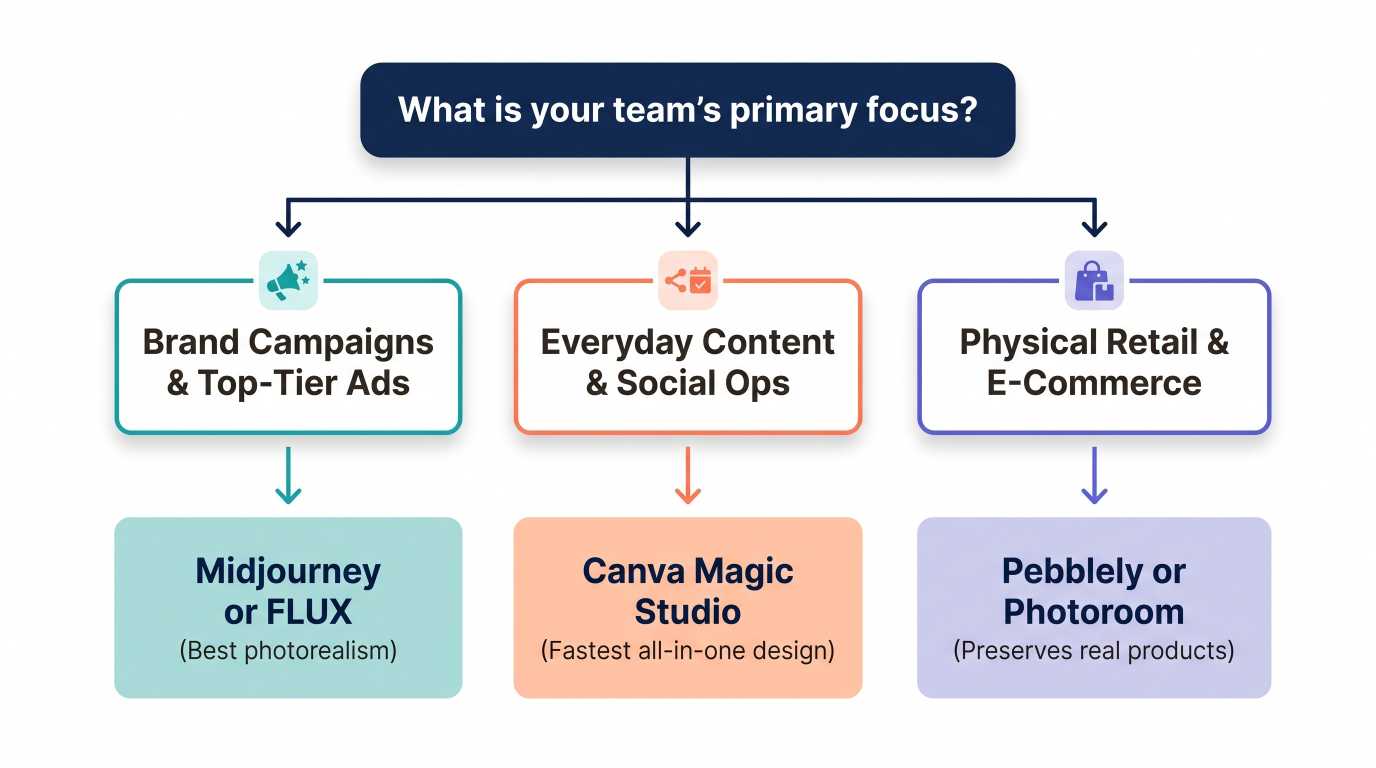
For General Content & Social Teams: Pick Canva Pro. It covers 80% of what you need every day—from social banners to basic AI generation—without a steep learning curve.
For High-End Creative Agencies & Ad Buyers: Combine Midjourney or FLUX (for stunning campaign imagery) with Adobe Photoshop/Firefly (for clean touch-ups and brand asset resizing).
For Direct-to-Consumer (DTC) Brands: Combine your phone camera with Pebblely or Photoroom to produce hundreds of clean product ads without booking a photo studio.
Best Practices: How to Write AI Image Prompts for Marketing
Getting poor results from an AI generator usually comes down to one issue: vague prompts.
If you type: "A woman drinking coffee," the AI has to guess everything. Is it a cartoon? Is it a photo? What kind of lighting? Is she in an office or a cabin?
Here is a simple, foolproof formula marketing teams can use for clean, consistent results:
$$\text{[Subject]} + \text{[Setting]} + \text{[Lighting \& Mood]} + \text{[Camera / Style]} + \text{[Aspect Ratio]}$$
Example 1: B2B Software Hero Image
Weak prompt: "Business people talking in an office."
Marketing-ready prompt: "A candid, realistic photograph of a diverse team of three colleagues reviewing data on a laptop in a bright, modern glass office. Soft morning window lighting, shallow depth of field, authentic corporate setting, shot on 35mm lens, high resolution --ar 16:9"
Example 2: Wellness / Fitness Ad
Weak prompt: "Woman running outside."
Marketing-ready prompt: "An athletic woman in her 30s jogging down a tree-lined city park street at sunrise. Golden hour rim lighting, dynamic motion blur in the background, sharp focus on her smiling face, modern athletic wear, editorial lifestyle photography --ar 4:5"
Three Golden Rules for Marketers
Specify the angle and space: Always mention if you need "negative space on the left side for headline copy." AI models will purposely leave empty sky or clean walls for your text.
Avoid buzzwords: Avoid typing "ultra-detailed 8K photorealistic masterpiece." Modern AI models ignore those old spam tags. Instead, describe real visual elements like "morning sunlight," "matte texture," or "clean studio lighting."
Keep your aspect ratio right from the start:
Use 16:9 for YouTube, website hero banners, and presentation slides.
Use 1:1 for standard Instagram feed squares and carousel posts.
Use 9:16 for Instagram Reels, TikTok ads, and smartphone stories.
Use 4:5 for high-converting Facebook and Instagram mobile feed ads.
💡 Need a Hand Launching Your Next Big Digital Project? High-quality AI visuals are only half the battle—you still need a fast, high-converting digital home for them. If your marketing team is ready to build custom Web and Mobile Apps, integrate smart AI workflows directly into your website, or launch a brand-new digital product, our team is here to build it for you. 👉 Let’s Build Your Web or App - Talk to Our Expert Developers Today!
Important Rules: Copyright, AdSense, and Commercial Safety
Before you hit publish on your new campaigns, keep these legal and brand guidelines in mind:
1. Can You Legally Sell or Advertise with AI Images?
On almost all major paid platforms (Midjourney Pro, Adobe Firefly, Canva, ChatGPT Plus), yes, you own the commercial rights to the output images. You can use them in paid social ads, billboards, packaging, and commercial blogs.
However, in many jurisdictions (including the United States), purely raw AI-generated art cannot be copyrighted under traditional copyright law. This means you can use the image freely to promote your business, but you cannot easily stop a competitor from downloading and using that same raw visual file. To build proprietary brand assets, have your design team add unique branding, typography, and composite layouts over the AI generation.
2. AdSense and Search Engine Compliance
Google's search guidelines state clearly that using AI-generated content or imagery is not against their policies. Google cares about value, helpfulness, and user experience, not whether a human or computer created the pixels.
To keep your site safe for Google AdSense and organic search rankings:
Never generate misleading imagery: Do not create fake news scenes, deceptive endorsements, or manipulated before-and-after photos for health products.
Keep image file sizes fast: Run your AI images through a compressor (like TinyPNG) and save them as modern WebP formats so your site loads under 2 seconds.
Always write clear Alt Text: Describe what is in the image accurately for screen readers and SEO crawlers (e.g.,
alt="Modern standing desk in a clean home office setup").
Frequently Asked Questions (FAQ)
What is the single best AI image generator for marketing teams overall?
For most marketing teams, Canva Magic Studio is the most practical day-to-day choice because it combines AI generation with practical layout tools, brand templates, and team sharing. If your absolute top priority is cinema-grade photo realism, Midjourney is the top visual performer.
Can AI image generators handle brand logos and fonts?
Most AI generators still struggle to reproduce exact, trademarked vector logos accurately from scratch. The best workflow is to generate your background or photo in tools like Midjourney or FLUX, and then import it into Canva or Photoshop to place your vector logo file and brand fonts on top.
Are AI image generators expensive for small marketing teams?
Not at all. Most top platforms cost between $10 and $30 per user per month. Compared to a single custom brand photoshoot (which easily costs $2,000 to $5,000), AI image tools save thousands of marketing budget dollars every quarter.
How do I prevent my AI images from looking fake or "creepy"?
Keep your prompts grounded in reality. Avoid dramatic fantasy lighting unless your brand specifically calls for it. Ask for "candid, natural lighting" and "neutral color grading." Also, review hands, eyes, and background objects carefully before launching any paid advertising campaign.
The Bottom Line
AI image generators are no longer tech toys for hobbyists. For modern marketing teams, they are essential creative engines that slash turnaround times from days to minutes.
If you want jaw-dropping realism, test Midjourney or FLUX.1.
If you want fast, practical social media posts, stick with Canva Magic Studio.
If you need 100% legal protection and retouching, lean on Adobe Firefly.
If you sell physical products online, start with Pebblely or Photoroom.
Pick one tool that matches your biggest bottleneck this week, test three simple prompts, and see how much time your creative team wins back.
Ready to grow your business?
Contact us today to find out how our strategies can scale your operations to the next level.
Contact Us