Best AI Coding Assistants for Laravel Developers in 2026
Hey everyone! If you build web apps with Laravel, you already know why it is one of the most loved PHP frameworks in the world. Elegant syntax, built-in authentication, clean database migrations, and expressive Eloquent queries make coding feel fun and organized.
Writing boilerplate code, remembering complex Eloquent relationship methods, building repetitive Form Requests, or hunting down a random bug inside a Service Provider can eat away hours of your day.
AI coding tools are transforming how developers work. But here is the catch: generic AI tools often stumble with Laravel.
Laravel has its own conventions. It uses magic methods, facade patterns, specific folder structures, and unique Blade templating tags. An assistant that only knows plain PHP might suggest code that breaks Laravel best practices.
In this guide, we break down the best AI coding assistants for Laravel developers, sharing real-world strengths, weaknesses, pricing, and how each tool handles day-to-day Laravel tasks.
What Makes an AI Coding Assistant Great for Laravel?
Before diving into the tools, let's talk about what makes an AI assistant actually useful for a Laravel developer.
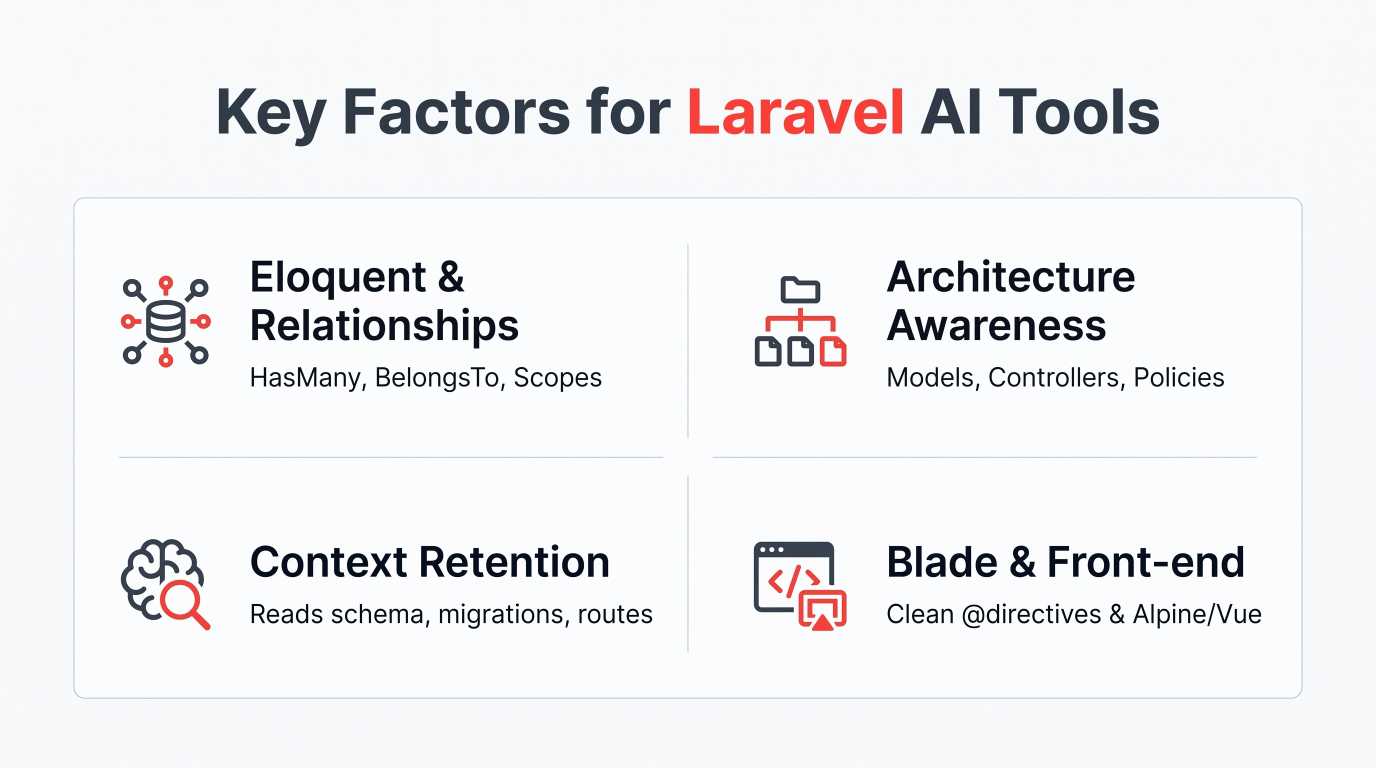
1. Understanding Laravel Magic and Conventions
Laravel relies heavily on dynamic method calls and conventions over configuration. An ideal tool understands:
Dynamic Eloquent builders like
whereNull(),scopeActive(), and relationship chaining.Laravel Facades like
Log::info(),Storage::disk(), andCache::remember().Form Request validation rules and custom validation rules.
2. Full Workspace Context
If an AI assistant only looks at the single file you have open, it cannot see your database migrations, your .env structure, or your existing custom traits. The best tools read your entire project repository so they know your exact table columns and Model definitions.
3. Clean Blade and Modern Front-End Support
Most Laravel developers pair the backend with Blade, Livewire, Inertia.js, or Vue/React. A solid coding companion should effortlessly handle Blade directives (@auth, @push, @vite) and front-end state management.
Quick Comparison Table
Tool | Best Used For | Supported IDEs | Context Depth | Free Tier Available? |
GitHub Copilot | Fast inline autocompletion | VS Code, PhpStorm, Neovim | High | Free plan available |
Cursor | Whole-project codebase awareness | Cursor (VS Code fork) | Very High | Yes (Free trial/tier) |
PhpStorm AI Assistant | Deep native PHP & JetBrains integration | PhpStorm | Very High | Free trial |
Supermaven | Lightning-fast low-latency suggestions | VS Code, JetBrains, Neovim | High (1M+ tokens) | Yes |
Claude (Sonnet / Anthropic) | Architecture planning & complex refactoring | Web, VS Code extensions | Massive context | Free & Paid tiers |
Tabnine | Private, enterprise-safe local models | VS Code, PhpStorm, Eclipse | Moderate | Yes |
Codeium (Windsurf) | Cost-effective codebase chat & multi-file edits | VS Code, JetBrains, Windsurf | Very High | Yes |
ChatGPT (Custom GPTs) | Schema design & concept explanation | Web, Mac/Windows apps | High | Free & Paid tiers |
Sourcegraph Cody | Deep search across huge legacy codebases | VS Code, JetBrains | Very High | Yes |
🚀 Building something complex? Let’s build it together. Transitioning from AI-assisted code to a fully scalable application requires expert architecture. Our team partners with businesses to develop high-performance Laravel web and mobile solutions. No sales pitches, just experienced engineers ready to turn your vision into production-ready software. Schedule a Brainstorming Session
In-Depth Reviews: The Best AI Coding Assistants for Laravel Developers
1. GitHub Copilot: The Industry Standard for Inline Suggestions
GitHub Copilot is the most widely adopted AI companion on the market, backed by OpenAI models. For Laravel developers working in VS Code or PhpStorm, it blends directly into your editor.
Why It Works Well for Laravel
Copilot shines at predicting the next line or block of code. When you write a docblock comment like // Get active users who signed up this month, Copilot immediately suggests the exact Eloquent chain:
PHP
// Get active users who signed up this month
$users = User::query()
    ->where('is_active', true)
    ->whereBetween('created_at', [now()->startOfMonth(), now()->endOfMonth()])
    ->get();
Because Copilot has ingested millions of open-source Laravel packages, it understands Artisan commands, PHPUnit / Pest tests, and Blade template syntax with high accuracy.
Pros:
Seamless integration with VS Code, PhpStorm, and Neovim.
Fast, low-friction inline completions.
Workspace-wide chat inside the sidebar (
@workspacecommand).
Cons:
Occasionally hallucinates non-existent Eloquent methods on custom models if your migrations are not directly referenced.
Requires manual prompting to adhere to modern Laravel 11/12 minimal directory structures.
2. Cursor: The Full-Codebase Powerhouse
Cursor is an AI-first fork of VS Code. Instead of treating AI as an add-on plugin, Cursor is engineered entirely around AI interaction.
Why It Works Well for Laravel
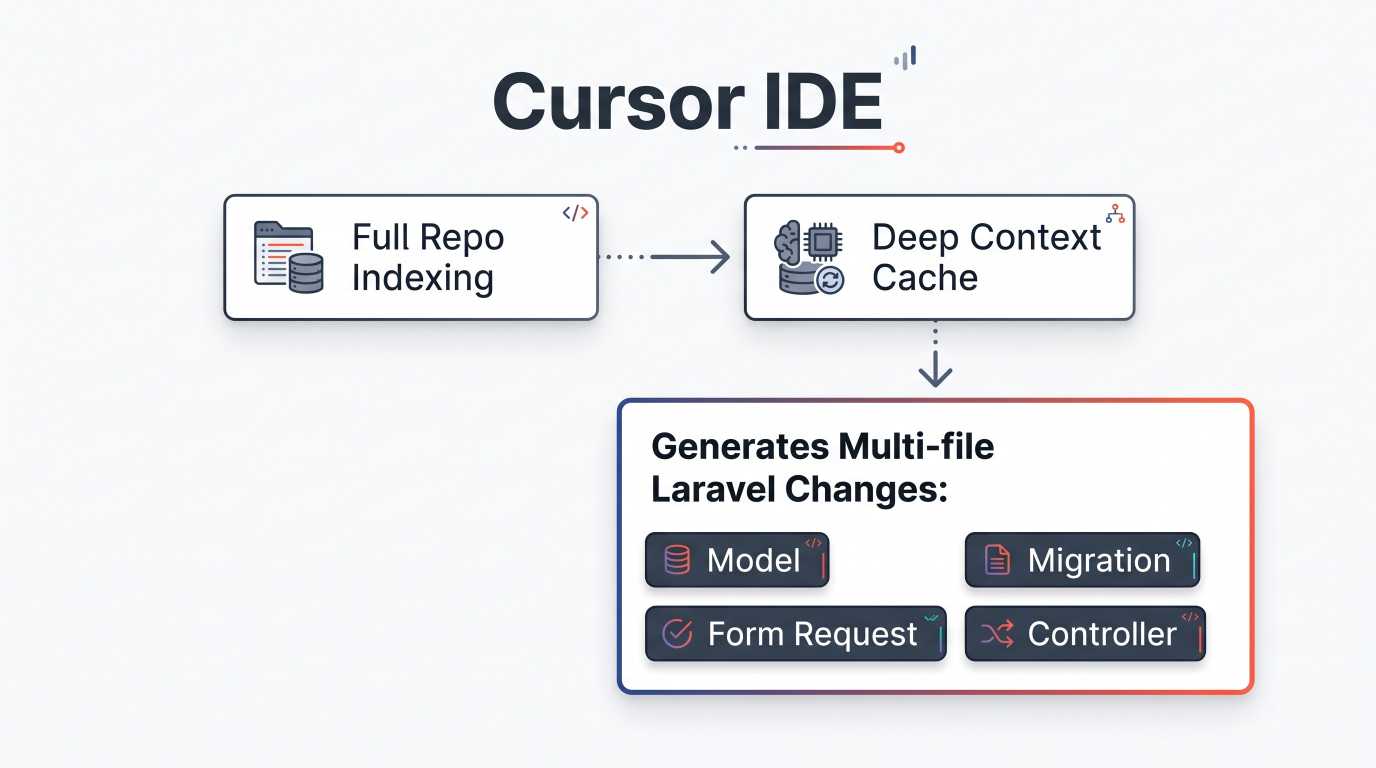
Laravel projects are divided into distinct layers: Migrations, Models, Controllers, Requests, and Views.
With Cursor's @Files and @Codebase features, you can prompt:
"Create a new payment subscription checkout flow using our existing Stripe service and update the User model relationship."
Cursor inspects your existing database schema, references your custom Stripe service class, creates the new controller, and updates the User model simultaneously.
Pros:
Multi-file editing allows creating a migration, model, and controller in one go.
Indexes your entire Laravel codebase locally for context-aware suggestions.
Supports leading models like Claude 3.5 Sonnet and GPT-4o.
Cons:
Requires switching from PhpStorm if you prefer traditional JetBrains IDE features.
Heavy project indexing can demand substantial computer memory.
3. JetBrains PhpStorm AI Assistant: Native PHP Intelligence
For developers who refuse to give up PhpStorm's deep PHP static analysis, JetBrains built its own integrated AI Assistant.
Why It Works Well for Laravel
PhpStorm already understands PHP types, PHPDoc blocks, namespace imports, and Laravel plugins (such as Laravel Idea). The JetBrains AI Assistant combines large language model intelligence with PhpStorm's local Abstract Syntax Tree (AST).
This means the assistant knows if a variable is undefined, whether a method visibility is protected or public, and automatically organizes your imports without breaking formatting rules.
Pros:
Tightly coupled with JetBrains refactoring tools.
Generates accurate Pest PHP and PHPUnit tests based on method signatures.
Understands strict PHP types (
declare(strict_types=1);).
Cons:
Requires an active JetBrains subscription alongside the AI add-on.
Chat interface is slightly slower than lightweight alternatives like Supermaven.
4. Supermaven: The Fastest Autocomplete on the Market
Created by the team behind TabNine, Supermaven focuses on speed and a massive 1-million-token context window.
Why It Works Well for Laravel
Latency is the enemy of developer focus. Waiting 1.5 seconds for a suggestion interrupts your thought process. Supermaven delivers suggestions in under 250 milliseconds.
With its long context window, Supermaven can hold all your project's model relationships, config files, and route declarations in active memory, making repetitive tasks, like building data tables or validation rules, feel instantaneous.
Pros:
Blazing-fast response times.
Huge context window handles extensive codebases effortlessly.
Lightweight extension footprint in both VS Code and PhpStorm.
Cons:
Focuses primarily on autocompletion rather than conversational architectural advice.
Lacks complex multi-file visual diff builders.
5. Claude (Sonnet) via Web & Extensions: Best for Complex Architecture
When you are planning a complete database schema or refactoring a 500-line legacy controller into modern Single Action Controllers and Action classes, Claude remains a top choice.
Why It Works Well for Laravel
Claude produces clean, idiomatic code and writes documentation that adheres to modern Laravel guidelines. It understands:
Laravel Service Providers, Middleware pipelines, and Event/Listener bindings.
Queueable Jobs, Batching, and Deadlock prevention.
Custom Artisan commands with interactive console prompts.
You can paste your entire schema.rb or migration files into Claude and ask it to design an optimized indexing strategy for MySQL or PostgreSQL.
Pros:
Excellent logic and high adherence to clean coding principles.
Avoids deprecated PHP practices.
Explains complex architectural trade-offs clearly.
Cons:
Requires an extension (like Continue.dev or Claude Dev) to run inside your IDE without copying and pasting.
6. Codeium & Windsurf: Feature-Packed Alternative
Codeium provides a generous free tier for individual developers, while its dedicated IDE, Windsurf, introduces advanced "Flow" concepts for collaborative coding.
Why It Works Well for Laravel
Codeium indexes your repository to understand where your custom helpers, scopes, and middleware live. If you are on a budget and want project-aware AI chat and inline code completion without a monthly subscription, Codeium is a capable alternative to GitHub Copilot.
Pros:
Generous free tier for individuals.
Supports both VS Code and JetBrains IDEs.
Fast inline suggestions and clean chat interface.
Cons:
Occasional delays on large codebases during deep indexing.
Less specialized in PHP edge cases compared to native tools like PhpStorm AI.
7. Tabnine: Secure and Privacy-Centric AI
For developers working on proprietary client applications, strict data security policies might prohibit sending code to cloud servers.
Why It Works Well for Laravel
Tabnine offers secure, local, and private hosting options. It trains on your team's internal code repositories to adapt to your organization's custom Laravel coding standards and internal naming conventions.
Pros:
Enterprise-level data privacy and on-premises deployment options.
Zero data retention policies for strict security compliance.
Adapts to team-specific conventions over time.
Cons:
Local models require modern, powerful hardware to run smoothly.
Conversational capabilities are less flexible than cloud-based LLMs.
8. Sourcegraph Cody: The Legacy Code Detective
Working on a massive Laravel application that has been upgraded across versions from Laravel 6 to modern releases? Cody is designed for reading, understanding, and navigating large repositories.
Why It Works Well for Laravel
Cody uses Sourcegraph's code graph intelligence to trace dependencies across hundreds of directories. If you need to trace where a specific Event is fired across multiple packages and background jobs, Cody maps the path and suggests clean refactoring options.
Pros:
Exceptional search and retrieval across massive codebases.
Multi-repo context capabilities.
Supports models from Anthropic and OpenAI.
Cons:
Overkill for small or medium greenfield Laravel projects.
Initial setup and workspace indexing take time.
9. ChatGPT (Custom GPTs): Ideal for Rapid Prototyping
While not an in-editor completion tool by default, OpenAI's ChatGPT (especially custom-trained Laravel GPTs) remains an essential companion for early-stage planning.
Why It Works Well for Laravel
Before writing code, you can prompt ChatGPT with your business rules to generate:
Complete migration files with foreign key constraints.
Seeders and Model Factories using Faker.
Matching Pest tests covering edge cases.
PHP
// Example Factory generated for testing
User::factory()
    ->has(Post::factory()->count(3))
    ->create([
        'trial_ends_at' => now()->addDays(14),
    ]);
Pros:
Great for step-by-step learning and conceptual questions.
Formats markdown and documentation cleanly.
Quick generation of mock data, regex patterns, and seeders.
Cons:
Requires copying and pasting code back and forth between browser and editor.
Lacks direct knowledge of your immediate, uncommitted local changes.
Step-by-Step Guide: How to Get the Best Results from Laravel AI Tools
An AI tool is only as good as the instructions you provide. Follow these practical steps to write better prompts and produce higher quality code.
Step 1: Explicitly Define Your Laravel Version
Laravel changes syntax between versions. For instance, route handling, middleware configuration, and application bootstrapping changed significantly in Laravel 11. Always tell your assistant:
"We are using Laravel 11/12, PHP 8.3+, and Pest for testing. Use modern anonymous migrations and minimal application setup."
Step 2: Feed Your Database Schema First
AI cannot guess your database column names. Before asking it to write an Eloquent query, provide your migration or table schema:
SQL
-- Schema context
CREATE TABLE orders (
    id BIGINT PRIMARY KEY,
    user_id BIGINT,
    status VARCHAR(50),
    total_amount INT,
    created_at TIMESTAMP
);
Now, ask the assistant to generate the Model query or relationship methods. The generated code will use real column names instead of made-up ones.
Step 3: Enforce Modern Best Practices
Prevent your assistant from outputting outdated PHP code by setting firm constraints:
Request strict types (
declare(strict_types=1);).Demand Form Request classes instead of inline
$request->validate()in controllers.Ask for Eloquent API Resources to format JSON outputs cleanly.
Common Mistakes to Avoid When Using AI with Laravel
Even the best AI tools make mistakes. Watch out for these common issues:
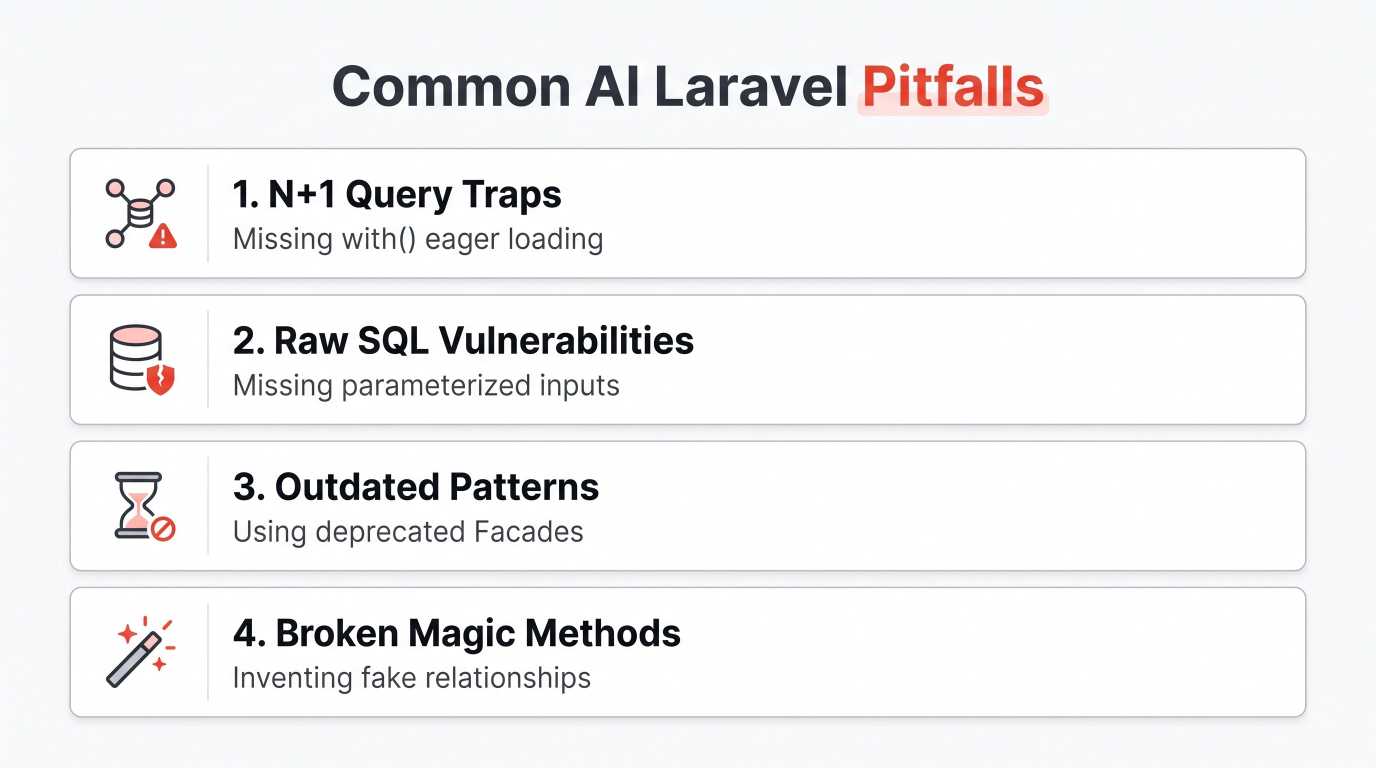
1. Falling into the N+1 Query Trap
AI assistants frequently write loops that query the database on every iteration:
PHP
// Risky AI Code: Causes N+1 query problem
$orders = Order::all();
foreach ($orders as $order) {
    echo $order->customer->name;
}

// Correct Laravel Practice: Always eager load relationships
$orders = Order::with('customer')->get();
Always review generated code to confirm relationships are eager-loaded with with().
2. Missing Mass Assignment Protection
When an AI generates a controller, it may suggest Model::create($request->all());. This can expose your application to mass assignment vulnerabilities if $fillable or $guarded properties are misconfigured in your Model. Always verify that validation rules match your Model safety settings.
3. Inventing Fake Methods
Laravel's magic methods make it easy for an AI to assume that methods like whereActiveStatusAndPaid() exist when they do not. Always run your automated test suite or verify methods in the official Laravel documentation.
Which AI Coding Assistant Should You Choose?
If you use VS Code and want a smooth, dependable balance of speed and auto-complete, start with GitHub Copilot.
If you want an AI-first editor that refactors multiple files across your entire project at once, choose Cursor.
If you rely on PhpStorm's refactoring tools and static analysis, pick the JetBrains AI Assistant.
If you want ultra-fast autocompletion with no lag, try Supermaven.
If you need to plan complex architectures and design database schemas, lean on Claude 3.5 Sonnet.
Combining tools is also a common workflow: many developers use Supermaven or Copilot for rapid inline typing in their IDE, while consulting Claude or Cursor for complex feature planning.
Frequently Asked Questions (FAQ)
Can an AI coding assistant replace a senior Laravel developer?
No. AI tools generate boilerplate code, speed up repetitive typing, and explain unfamiliar syntax. They do not understand overall business logic, system architecture tradeoffs, compliance requirements, or real-world security implications.
Will AI assistants slow down my editor?
Lightweight extensions like Supermaven and Copilot have minimal impact on system performance. AI-first editors like Cursor or heavy multi-repo indexers like Cody require more RAM and CPU power to index your project files.
Is my proprietary Laravel code safe with these tools?
Most enterprise-focused tools (such as GitHub Copilot for Business, Tabnine, and JetBrains AI) offer strict privacy guarantees, ensuring your proprietary code is never used to train public machine learning models. Always check your company's data privacy policies before indexing private codebases.
Do these AI tools support Pest PHP?
Yes. Modern models like Claude 3.5 Sonnet, GPT-4o, and GitHub Copilot are well-versed in Pest syntax. Simply specify in your prompt that you are writing tests using Pest instead of standard PHPUnit.
Final Thoughts
AI coding assistants are no longer just experimental toys: they are daily productivity boosters for modern web developers. By choosing an assistant that respects Laravel conventions, feeding it proper database context, and reviewing generated code for security and query performance, you can build clean, reliable Laravel applications faster than ever.
You can also check:
Best AI Coding Tools in 2026
How Startups Can Use AI Without a Large Team
How to Find High-Paying Clients for Your Startup Agency
Ready to grow your business?
Contact us today to find out how our strategies can scale your operations to the next level.
Contact Us