How Tech Companies Handle Employee AI Usage: Rules, Tools, and Real Stories
Have you ever sat at your desk, stared at a blank screen, and opened an AI chat window to help draft an email or fix a line of code?
If you have, you are definitely not alone.
Almost every worker in the tech world has done this at least once over the past couple of years. It feels like magic. You type a question, hit Enter, and boom—you have an answer in three seconds.
But behind the scenes, bosses, security engineers, and HR managers are having completely different conversations. They are asking: Wait a second. What did our engineer just paste into that website? Was that our secret product roadmap? Did they just share customer financial data with a public server?
This brings us to a huge question facing modern workplaces: how tech companies handle employee AI usage.
Some companies tried to ban AI completely. Some said, “Go wild and use it for everything!” And most companies quickly realized that neither extreme works in real life.
In this guide, we are going to break down exactly what top tech companies are doing, the mistakes they made early on, how they protect their data, and how your own company can build a smart, safe AI plan without making your team hate their jobs.
Why Employee AI Usage Became Such a Huge Topic
To understand where we are right now, we have to look back at how fast everything moved.
Usually, when new software enters a company, it goes through an IT review. IT tests it, legal looks at the contract, finance approves the budget, and six months later, employees get an account.
Generative AI did not wait for any of that.
Employees discovered tools on their own phones and personal laptops. They saw how much time it saved them. Suddenly, people were finishing 4-hour tasks in 30 minutes. Naturally, they started using these tools at work every single day, often without telling their managers.
This created a major shift in the workplace.
The Rise of Shadow AI at Work
Tech folks have a special name for this: Shadow IT. When it comes to artificial intelligence, people call it Shadow AI.
Shadow AI simply means employees using AI tools that their company’s tech team did not officially approve or check.
Why do people do it? Not because they want to harm the company. They do it because they want to do their jobs faster!
A customer support agent uses AI to rewrite an angry email into a polite reply.
A programmer pastes a messy error code to find a bug.
A marketing specialist asks AI for ten fresh blog post ideas.
When workers see results instantly, they do not want to wait three months for the IT department to say yes.
Why Speed and Panic Collided in the Tech World
The problem started when big incidents hit the news.
A famous example happened early on at a global electronics giant. Engineers were trying to fix a bug in their chip software, so they pasted source code directly into a public AI tool. Right after that, another employee pasted notes from an internal meeting to create a quick summary.
Those public AI tools were set up by default to learn from user inputs. That meant private, proprietary code and private meeting notes were now sitting on an outside company's servers.
Panic spread quickly. Within weeks, huge banks and tech brands sent out company-wide emails saying: Stop using external AI tools immediately.
How Tech Companies Handle Employee AI Usage: Three Common Approaches
After the initial panic settled down, tech companies realized something important: you cannot simply ban a tool that doubles an employee's output. If you ban it, people will just sneak around the rules and use it on their personal phones.
Today, tech companies generally fall into three distinct camps.
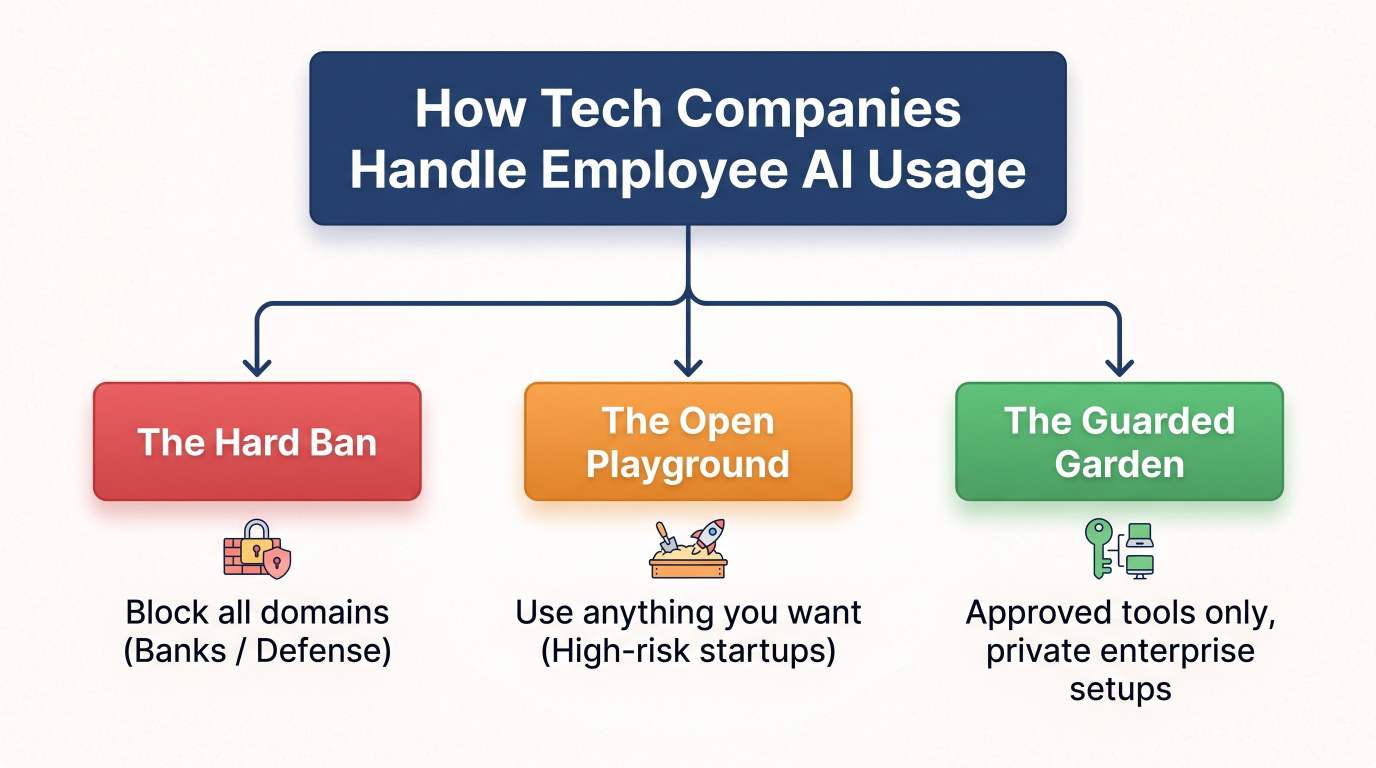
1. The Hard Ban (The Wall)
Some companies still block almost all public AI websites on company laptops and internal Wi-Fi.
You usually see this in:
Banks and payment processors
Healthcare tech companies
Defense and government contractors
These companies handle health records, credit cards, or national security data. For them, a single data leak can mean millions of dollars in government fines. So, their rule is simple: zero outside AI tools allowed on company devices.
Is it safe? Yes. But it also frustrates employees and slows them down compared to competitors.
2. The Open Playground (Move Fast and Hope for the Best)
On the opposite side, you have early-stage startups.
Their attitude is: “We need to ship products today. We do not have time for policies. Use whatever tool makes you build twice as fast.”
This works great for speed, but it creates huge hidden risks. If a startup later tries to sell itself or raise funding, investors will ask: “Did an AI write this core code? Is there copyrighted code inside your product?” If the founders do not know the answer, deals can fall apart.
3. The Guarded Garden (The Modern Standard)
This third approach is what the smartest tech companies use today.
Instead of saying "No," they say: "Yes, but use our secure door."
They buy special business licenses for AI models where the provider guarantees:
Your data will never be stored permanently.
Your data will never be used to train future public models.
Everything stays encrypted inside a private workspace.
This way, the employee gets all the speed and help they want, and the company sleeps peacefully knowing their trade secrets stay safe.
The Biggest Risks Companies Worry About
To really see why companies write these strict policies, let's look at the actual dangers they are trying to prevent. None of this is mystery science; it comes down to simple business safety.
1. Leaking Confidential Data
This is risk number one. Tech companies spend millions of dollars creating their software, customer lists, and financial plans.
If an employee pastes a customer's real name, email address, or credit card number into a public chatbot, that is an immediate privacy breach. Laws like GDPR in Europe and CCPA in California carry heavy fines for mishandling customer data.
2. Hallucinations and Bad Code
AI tools are fantastic, but they are not search engines that check facts with 100% accuracy. They are pattern-matching engines. Sometimes, when they do not know the answer, they make things up with total confidence. Tech experts call this an AI hallucination.
Imagine a junior developer asks AI to write a security check for a login page. The AI gives them code that looks clean and runs smoothly, but it contains a hidden security hole. If the developer copies and pastes it without reviewing every line, hackers could break in later.
3. Copyright and Intellectual Property Problems
Who owns something created by AI? The legal system is still figuring this out around the world.
If an AI tool was trained on copyrighted software code and spits out an exact copy of that code into your company's app, your company could face copyright lawsuits. Tech firms want to make sure that everything they sell is 100% owned by them.
What a Good Company AI Policy Actually Looks Like
Nobody reads a 50-page legal document. Smart tech companies know this, so they write clear, simple policies that any worker can understand during their first week on the job.
Here is what the best policies cover:
Policy Area | What the Company Allows | What the Company Forbids |
Tool Selection | Approved company accounts & internal tools | Random free tools found online |
Input Data | Public text, generic ideas, non-sensitive drafts | Customer data, passwords, secret code |
Verification | Human checks every line of text or code | Blindly copying and publishing AI output |
Transparency | Telling your team when AI built a big asset | Hiding AI usage from clients or teammates |
The "Traffic Light" Rule
Many tech teams use a simple Traffic Light framework to teach employees how to handle employee AI usage safely:
🟢 Green (Safe to do): Brainstorming ideas, summarizing public articles, drafting rough outlines, asking for grammar checks on general emails.
🟡 Yellow (Be careful / Check first): Drafting internal documentation, analyzing cleaned data with all customer names removed, writing non-core utility scripts.
🔴 Red (Never do this): Pasting production passwords, uploading customer databases, sharing unannounced product roadmaps, pasting patient or financial data.
This system takes five minutes to explain, and employees actually remember it.
The Tools Tech Companies Build to Keep Things Safe
How do companies enforce these rules without acting like police? They build smart technical systems that guide employees automatically.
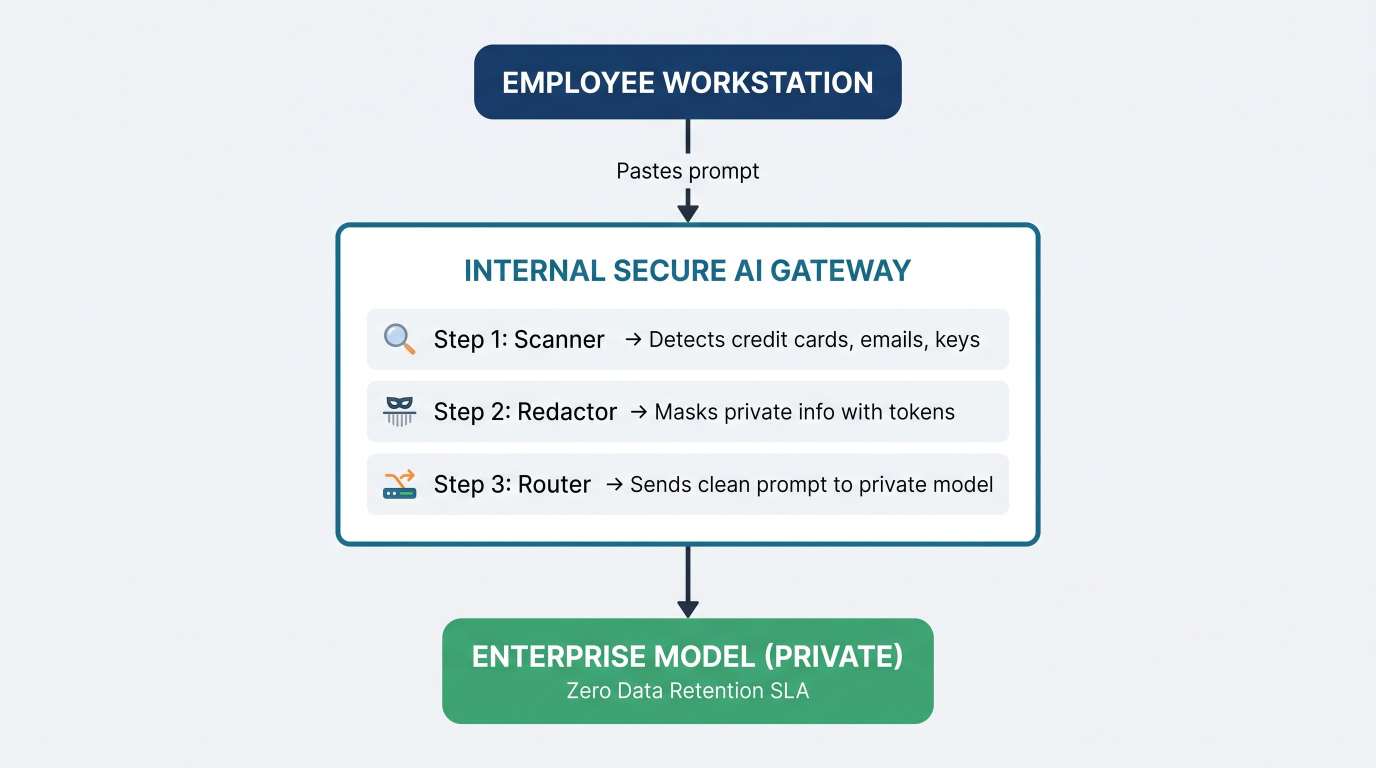
1. Internal AI Portals
Instead of letting employees go to public websites, many tech companies build their own simple chat interface hosted inside their private network.
When an employee logs in with their work email, the prompt goes through an internal server first. That server checks for sensitive items like:
Social Security numbers
Credit card numbers
API secret keys and passwords
If an engineer accidentally pastes an API key, the system automatically blocks the prompt and pops up a friendly message: "Oops! It looks like you included an API key. Please remove it before continuing."
2. Enterprise Agreements with Zero Retention
When tech companies buy AI from major providers, they do not use the $20/month personal plans. They sign formal enterprise contracts.
These contracts include a feature called Zero Data Retention (ZDR). This means:
The provider processes the request to generate the answer.
The moment the answer is sent back, the prompt is erased from the provider's memory.
The provider legally signs that your data will never train future versions of the public model.
This single feature solved the biggest fear corporate security teams had.
3. Automated Code Scanners
For software developers, tech companies use automated tools that scan code repositories before code is merged into the live product.
These tools scan for:
Known open-source licenses that require code sharing
Deprecated or unsafe programming patterns
Code snippets that match copyrighted databases
If an engineer accepts code from an AI assistant, the automated scanner acts as a second set of eyes to catch problems before customers ever see them.
How Different Departments Use AI Safely
When people talk about AI in tech companies, they often think only of software engineers. But modern tech firms have hundreds of roles. Here is how different teams handle employee AI usage across the office.
Software Engineers: Coding Buddies, Not Replacements
Developers use AI coding assistants right inside their code editor. These tools suggest the next line of code, auto-complete repetitive functions, and write test cases.
What works: Asking AI to write basic boilerplate code, convert code from one language to another, or explain confusing error messages.
The rule: The human engineer is 100% responsible for every single line of code they commit. If the code breaks production, saying "the AI wrote it" is not an acceptable excuse.
Customer Support: Faster Answers, Human Review
Support teams receive thousands of tickets every single day. AI helps them read long customer complaints and summarize the problem in two sentences.
What works: Generating a first draft of a troubleshooting answer based on internal help articles.
The rule: An actual human support agent must read the draft, verify the links, and click "Send." AI is never allowed to send unreviewed emails directly to angry customers.
Marketing and Content Teams: Brainstorming Machine
Marketing teams write emails, social posts, video scripts, and landing pages.
What works: Overcoming writer's block. If a writer is stuck, they ask AI for twenty headline ideas or five different angles for an announcement.
The rule: Never publish raw AI text directly. Human writers must rewrite, fact-check, add brand voice, and verify that all claims are true.
Human Resources and Legal: Strict Guardrails
HR and legal teams handle the most sensitive information in the entire company: salaries, performance reviews, hiring decisions, and contracts.
What works: Using AI to check grammar on company-wide announcements or formatting standard templates.
The rule: AI is never used to make hiring or firing decisions. Automated evaluation of candidates can introduce unfair bias, which violates labor laws in many regions.
Common Mistakes Companies Make (And What to Do Instead)
Many companies handled this poorly when AI first went viral. Here are the biggest traps tech firms fell into, and the smarter choices they make now:
Mistake 1: Banning AI Without Offering an Alternative
The result: Employees sneak tools onto their personal phones and copy company data over anyway.
The fix: Give employees an approved, secure tool that is just as fast and easy to use as the public ones.
Mistake 2: Punishing Curiosity
The result: Employees hide how they work, creating zero visibility for leadership.
The fix: Reward teams that find clever, safe ways to automate boring tasks. Host internal "show and tell" sessions where workers share their best safe prompts.
Mistake 3: Assuming Employees Know the Law
The result: Well-meaning workers accidentally paste confidential customer data because nobody told them it was illegal.
The fix: Run short, visual training sessions once a quarter. Show clear examples of what can be pasted and what cannot.
Step-by-Step: How to Build an AI Policy for Your Team
If your company does not have a clear AI policy yet, you do not need to hire expensive consultants to get started. You can build a practical plan today using these four steps:
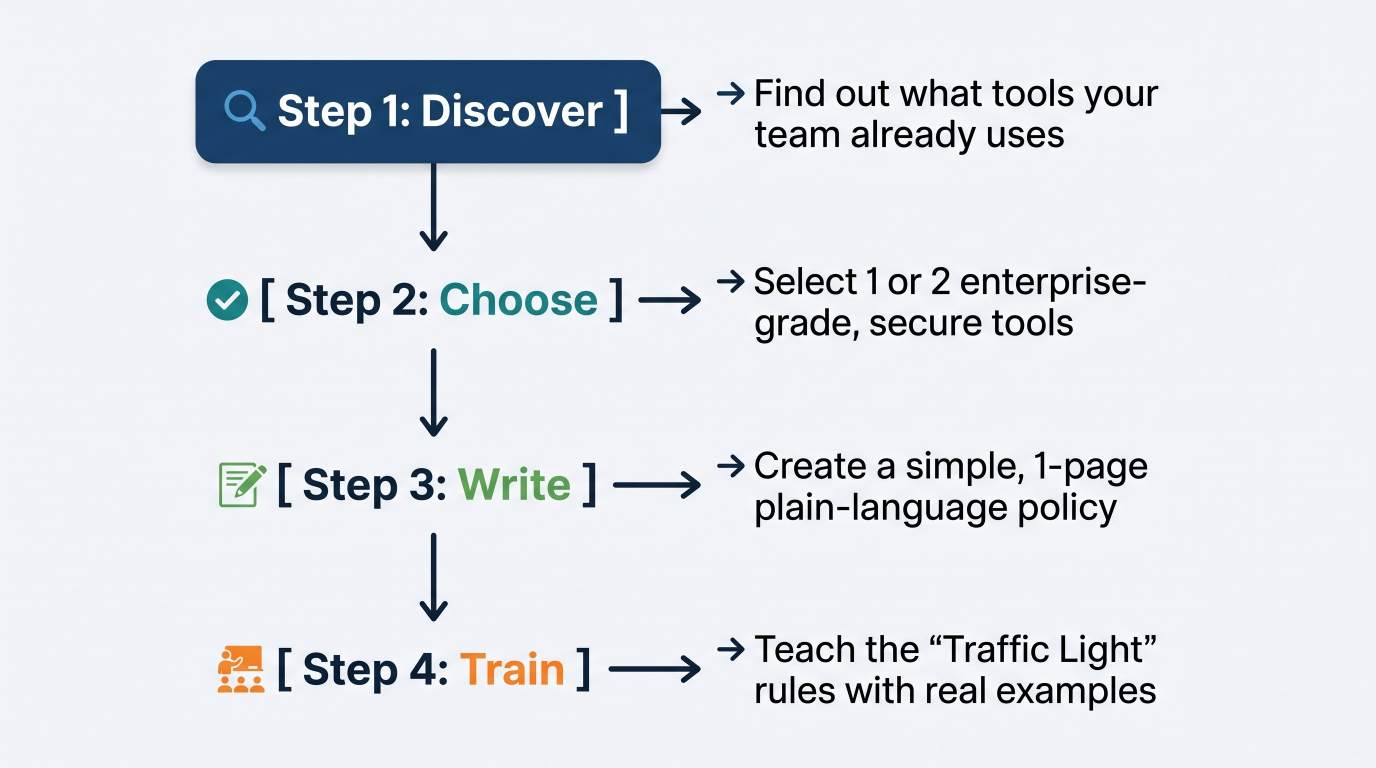
Step 1: Run an Anonymous Survey
Ask your team honestly: Which AI tools do you use? What tasks do you use them for? What tools do you wish we paid for? Make it anonymous so people feel safe telling the truth. You cannot fix what you do not see.
Step 2: Pick One Official Enterprise Tool
Instead of letting team members pay for different personal subscriptions on their company credit cards, buy one solid enterprise license for the whole team. Make sure it has explicit zero-retention and privacy guarantees.
Step 3: Keep the Rules on a Single Page
Write down what is allowed, what is risky, and what is strictly forbidden. Put it in plain English. Avoid complicated legal terms. Make sure everyone can read it in under five minutes.
Step 4: Run a 30-Minute Live Demo
Gather the company on a call. Show real examples:
"Here is how you use our enterprise tool to summarize a meeting safely."
"Here is an example of an API key—never paste this in."
"Here is who to message on Slack if you have a question."
Frequently Asked Questions (FAQ)
Can employers see if you are using AI tools at work?
Yes, in most cases. If you are using a company laptop or connected to company Wi-Fi, your IT department can see the websites you visit and the software installed on your machine. If you use a tool with a company login, managers often have access to usage logs and audit histories.
Is using AI for work considered cheating?
Not anymore. In modern tech companies, using AI effectively is viewed as a valuable productivity skill, just like using a spreadsheet or a search engine. The key difference is honesty: use approved tools, verify the output, and do not pretend you wrote something from scratch if company rules ask for transparency.
Why do companies block free AI tools but allow paid ones?
Free public AI tools often use the data you type in to train future models, which can expose private company information to the public. Paid enterprise versions include legal agreements that promise your data will remain private, encrypted, and never used for model training.
What happens if an employee leaks company data into an AI tool?
It depends on company policy and how serious the leak is. For an accidental slip with internal notes, it usually results in retraining. For leaking customer financial information, source code, or protected health data, it can lead to disciplinary action, termination, or legal liability.
The Bottom Line
Artificial intelligence is not a temporary trend that will fade away next year. It is now part of everyday work in the tech industry.
The companies winning right now are not the ones who pretended AI does not exist by banning every website. Nor are they the reckless ones who let sensitive data leak onto public servers.
The winners are the tech companies that set clear, human rules, provide safe enterprise tools, and encourage their workers to experiment responsibly.
When you give smart people the right tools with simple guardrails, they do their best work faster, safer, and with total peace of mind.
Ready to grow your business?
Contact us today to find out how our strategies can scale your operations to the next level.
Contact Us